Application Rationalization: How to Shrink the Portfolio Before You Modernize It
Application rationalization is a structured review of every application an organization runs, to decide which ones to keep, invest in, migrate, consolidate, or retire based on business value, technical condition, cost, and risk. The output a CIO can act on has three parts: a complete inventory with a fully loaded annual cost for each application, a disposition for each one, and a retirement plan that switches systems off and ends their contracts. The savings come only from the third part. An application marked for retirement keeps costing money until its data is archived, its integrations are cut, its licenses lapse at renewal, and its servers are shut down.
Why rationalize before you modernize?
Every application that enters a modernization or cloud program without a rationalization review costs money twice: once to move or rebuild it, and again to run it afterward. Most large portfolios carry duplicates that accumulated through acquisitions, decentralized purchasing, and projects that launched a new system without retiring the old one. Rationalization sets the scope of the modernization program, and it is the cheapest point at which to cut that scope. It also removes risk, since unsupported software and abandoned applications are where unpatched vulnerabilities and orphaned access accounts tend to sit.
An application portfolio assessment and a rationalization overlap heavily. The assessment collects the facts about each application, and the rationalization turns those facts into decisions with owners and dates. Programs that stop after the assessment produce a spreadsheet. Programs that finish the rationalization produce retirements.
Why is the inventory the hardest part?
No single system of record knows which applications a company runs. The configuration management database lists servers, finance lists vendors, single sign-on lists logins, and the three lists rarely agree. The US federal government shows how persistent that gap is. When GAO examined the 24 agencies covered by the Chief Financial Officers Act in 2016, only four fully met all four of its practices for application inventories, and GAO warned that not accounting for all applications may result in missed opportunities to identify savings and efficiencies. In January 2024, GAO found that agencies' software license data was inconsistent and incomplete, and that none of the nine agencies it selected for detailed review had fully determined whether their five most widely used licenses were over- or under-purchased.
Build the inventory by joining sources: the configuration management database, identity and single sign-on logs, accounts payable and the contract repository, cloud billing data, and network flow data. Then confirm each record with its owner. Decide early what counts as an application. A useful rule is anything with its own data, its own users, and its own cost line, which brings in critical spreadsheets, desktop databases, and departmental tools that never went through IT procurement. Those tools often hold the workarounds that explain why a larger system is underused, and retiring the larger system without accounting for them breaks the process they support. SaaS subscriptions bought on corporate cards need a discovery pass of their own, which our SaaS spend management guide covers.
What should the inventory record for each application?
Each application needs enough data to support a decision and no more. These attributes carry the weight:
- A business owner and a technical owner, by name.
- The business capability the application supports, taken from a shared capability map.
- Users and the usage trend, from login and transaction data.
- Fully loaded annual cost: licenses and subscriptions, infrastructure, support labor, and vendor services.
- Technical condition: supported versions, end-of-support dates, and open vulnerabilities.
- The data it holds, including regulated data and its retention obligations.
- Integrations in and out.
- Contract terms, renewal dates, and notice periods.
Usage data deserves particular care, because it settles arguments that opinions cannot. AWS's migration guidance classifies an application as a retirement candidate when its average CPU and memory use sits below 5 percent, when it sits between 5 and 20 percent over 90 days, or when the application has had no inbound connections in the last 90 days. Those thresholds start the conversation with the owner, and the owner's answer about month-end, year-end, and audit use finishes it.
How do you score applications and assign dispositions?
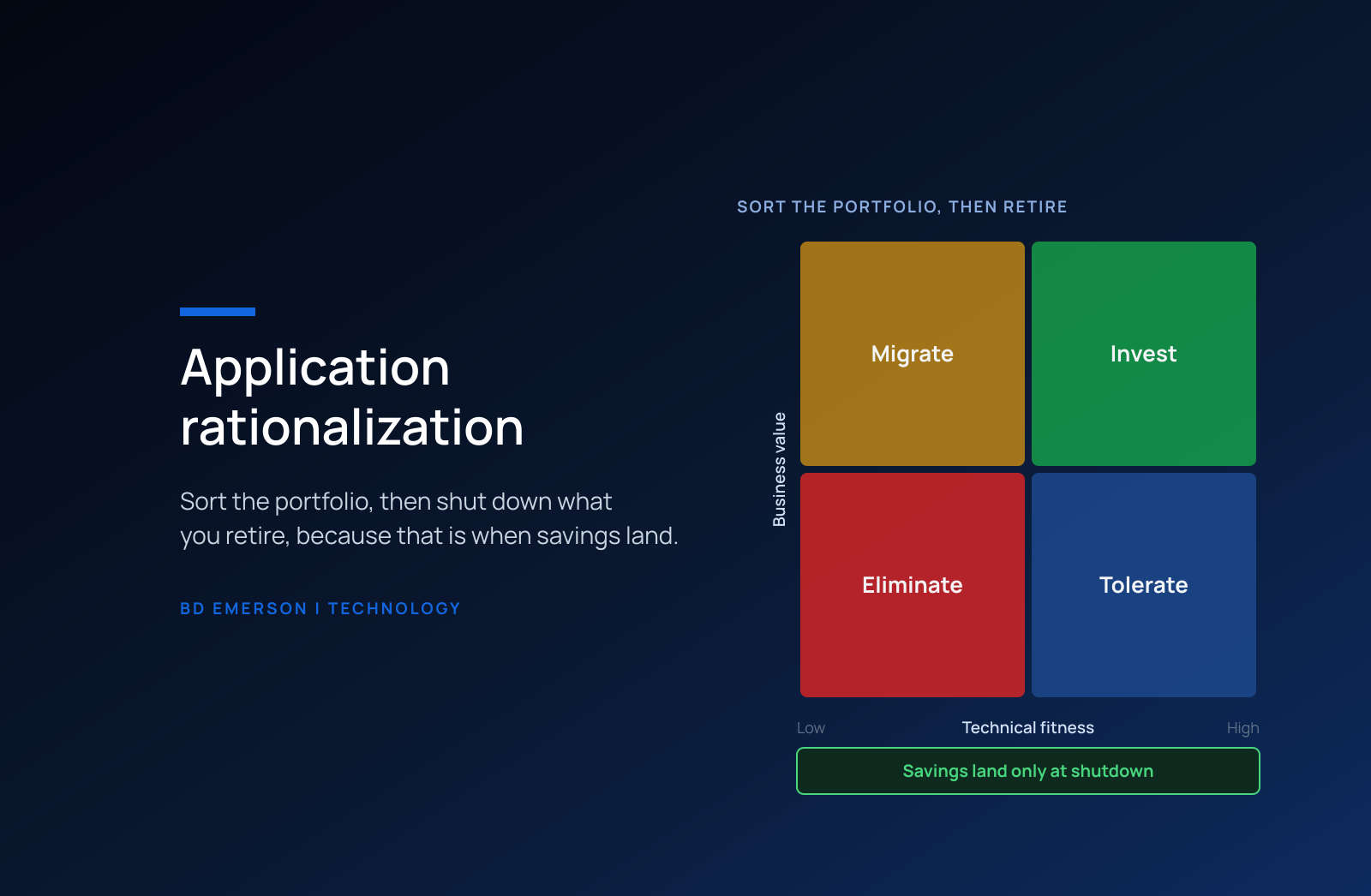
Score each application on two axes. Business value covers how critical the supported capability is, how many people depend on it, and whether revenue or regulatory obligations run through it. Technical fitness covers supportability, security, maintainability, and cost to run. Plotting the two produces four quadrants that map to the TIME model, short for tolerate, invest, migrate, and eliminate, and the capability map adds a fifth decision by exposing applications that duplicate each other.
| Disposition | Typical signal | Action | Where the savings come from |
|---|---|---|---|
| Tolerate | Low business value, sound technical condition | Run with minimal change and review at each renewal | Enhancement spend stops |
| Invest | High business value, sound technical condition | Fund enhancements and keep versions current | None directly; freed budget from the other dispositions lands here |
| Migrate | High business value, poor technical condition | Replatform, refactor, or rebuild on a funded roadmap | Lower run cost and lower risk after the move |
| Consolidate | Duplicates another application's capability | Choose a surviving system and move users and data to it | Licenses, infrastructure, and support for the retired duplicates |
| Eliminate | Low business value, poor technical condition | Archive the data, cut the integrations, and shut it down | Everything the application cost to run |
Two rules keep the scoring honest. Score with the business owner in the room, because technical teams cannot see all of the value an application carries. And decide consolidations capability by capability, comparing fit, contract terms, and migration cost for each candidate survivor, instead of defaulting to the newest or the most expensive system.
Where do the savings come from, and when do they arrive?
Savings arrive on dates you can predict. Subscription and license savings land at renewal, and only if someone gives notice inside the contract's notice period; miss it and the application costs another full term. Cloud infrastructure savings land when instances are shut down. On-premises infrastructure savings land only when a whole host, cluster, or rack can go, so group retirements by the infrastructure they share. Support labor savings land when people move to other work, which needs a plan of its own.
Retirement also costs money before it saves any. The data has to be archived in a read-only store that meets retention obligations, integrations have to be rerouted, users have to move to the surviving system, and someone has to run the final extract and sign off. BD Emerson planning range: three to nine months from a retirement decision to shutdown for a typical business application, and longer when regulated data must be archived. Publish a retirement calendar sequenced by renewal dates, and track realized savings in the general ledger, where the CFO will look for them. For license-heavy portfolios, the publisher-by-publisher tactics in our software license optimization guide add to the result.
How long does application rationalization take?
The first pass is short and the follow-through is long. BD Emerson planning range: 8 to 12 weeks to build the inventory, cost the applications, and agree dispositions for a portfolio of several hundred applications, then 12 to 24 months to work through the retirements and consolidations those decisions create. The first pass moves fastest when it starts from data the company already has, such as single sign-on logs, accounts payable, and contract records, and saves owner interviews for the applications where the data conflicts.
The dispositions then become the modernization roadmap. Migrate decisions form the modernization backlog, sequenced by business value and technical risk. Consolidate decisions become integration projects, each with a surviving system, a data migration, and a cutover date. Replacement candidates need a build vs buy comparison with a five-year cost on both sides before anyone signs a SaaS contract. Eliminate decisions free budget, and the invest decisions are where that budget should go. Publishing the roadmap with those links visible helps business owners accept a retirement, because they can see what the savings will fund.
Why do rationalization programs stall?
Rationalization stalls when nobody has the authority to retire an application its owner wants to keep. Give a portfolio board, chaired by the CIO with finance represented, the decision rights to approve dispositions and set retirement dates, and attach a sunset date to every eliminate and consolidate decision. Report progress against those dates every quarter, because a disposition without a date tends to stay a recommendation.
Programs also stall when the inventory decays. Keep it current by tying it to the processes that change it: procurement adds applications, vendor offboarding removes them, and an intake review checks whether an existing application already covers a capability before anyone buys a new one. A rationalization done once drifts out of date as the business buys and builds. Run it as a standing process, with a quarterly review of new spend and an annual review of every disposition.
BD Emerson runs application rationalization as the first phase of our modernization work: we build the inventory from your own systems of record, cost each application, agree dispositions with the business owners, and plan the retirements against your contract dates. Our application modernization services page explains how that phase leads into the rest of the program.

About the author