Palantir MCP and Ontology MCP: How AI Agents Build On and Act Through Foundry
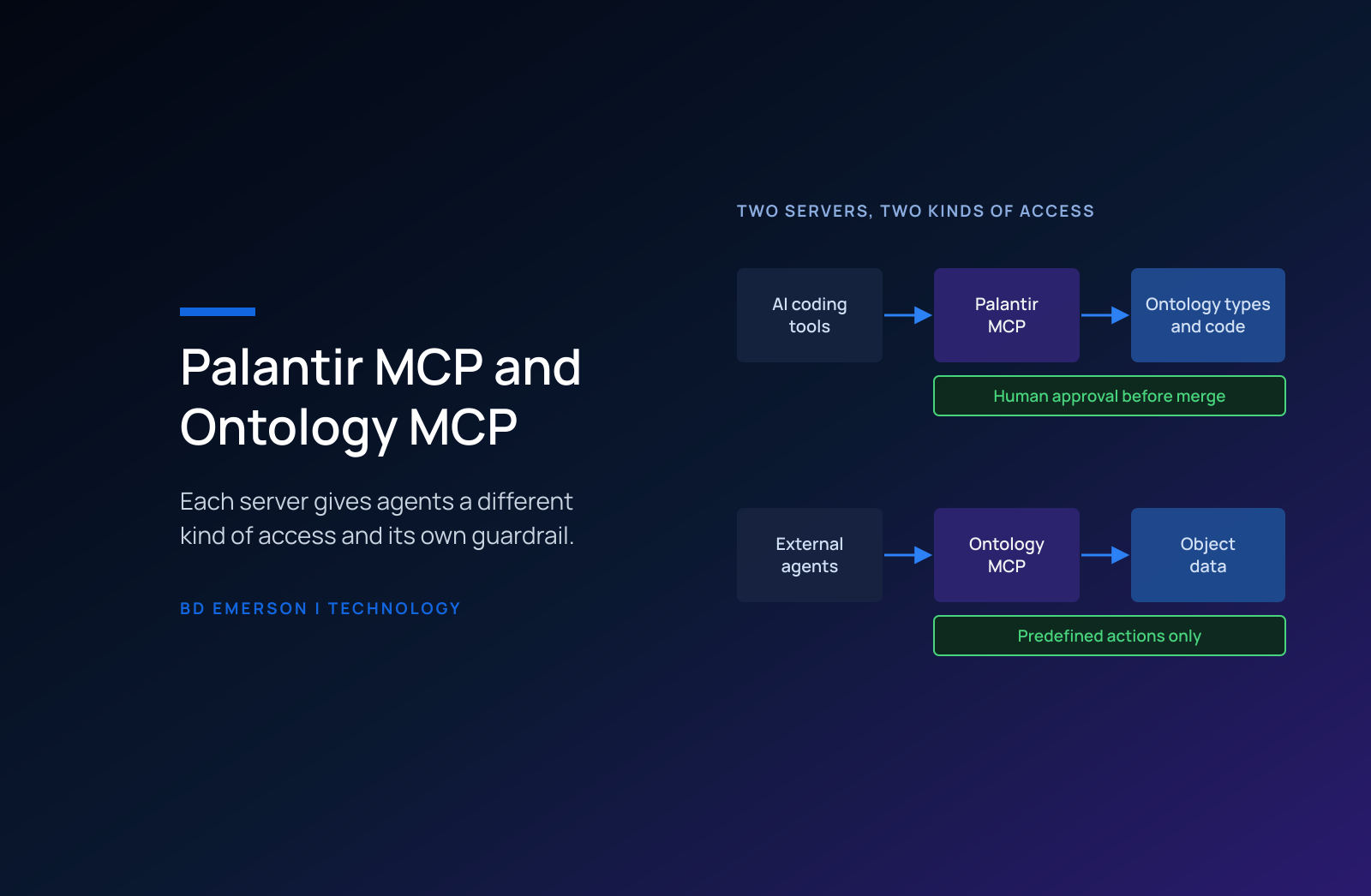
Palantir offers two Model Context Protocol (MCP) servers, and they serve different people. Palantir MCP is Palantir's implementation of MCP for builders: it lets AI coding tools such as Claude Code and agents in VS Code explore your ontology and Foundry projects, run Python transforms, and propose changes to ontology types, and it cannot write ontology data. Ontology MCP is a Developer Console feature for consumers: it turns an application into an MCP server that external AI agents use to read objects, execute predefined actions, and query data. Govern them as two separate risks, because Palantir MCP changes how your platform is built and Ontology MCP changes the data your operations run on.
What is MCP, and why does Palantir offer it?
The Model Context Protocol describes itself as "an open-source standard for connecting AI applications to external systems." An MCP server exposes tools and data, and an MCP client, usually an AI assistant or a coding agent, calls them. Our guide to the Model Context Protocol covers the standard in depth. For a Foundry customer, the practical point is that the agent your developers already use in their editor, or the agent your operations team wants to deploy, can reach Foundry through a documented interface instead of a custom integration that someone has to maintain.
What can Palantir MCP do?
The Palantir MCP documentation describes a server that "provides tools for LLM agents to explore your ontology and Foundry projects and to take actions." A developer installs it into an IDE, and the documentation names Claude Code and the Continue agent in VS Code as example clients. With it, an agent can search the ontology, create an object type or link type and wire it into an application, update a Developer Console application, and run Python transforms. The documented loop for pipeline work is practical: the agent previews a transform, reads the error, fixes the code, and reruns the preview until it succeeds.
The documentation draws the boundary in one sentence: Palantir MCP "is designed for ontology builders and can modify ontology types, but cannot write ontology data." It changes the shape of your platform, meaning object types, link types, applications, and pipeline code, while the records inside the ontology stay out of its reach.
What can Ontology MCP do?
Ontology MCP works on the data side of the ontology. Palantir's Ontology MCP documentation calls it "a Developer Console feature that exposes your application's ontology resources," and says that with it, "your application becomes an MCP server that AI agents can connect to as MCP clients." Those agents can read objects, execute predefined actions, and query data. The Developer Console application sets the scope, and Palantir recommends application restrictions and permissions to limit which actions an agent can take and to protect sensitive resources.
The Palantir MCP overview describes Ontology MCP as the way ontology consumers "safely read and write data to your ontology through external AI agents." The writing happens through actions. An agent connected through Ontology MCP changes data only by executing an action type your team defined, with the parameters, validation, and side effects that action type carries. That design puts your controls in a familiar place: the same action types your Workshop applications use, reviewed by the same ontology steward, with one more caller.
The table compares the two servers on the questions a platform owner asks before enabling either one.
| Question | Palantir MCP | Ontology MCP |
|---|---|---|
| Who it serves | Builders working in AI coding tools | External AI agents acting as ontology consumers |
| What it changes | Ontology types, applications, and pipeline code | Ontology data, through predefined actions |
| What it cannot do | Write ontology data, or update and delete existing datasets | Take actions the application's restrictions do not allow |
| Where it is turned on | Control Panel, for local development, where it ships disabled | Developer Console, per application |
| The control that matters most | Human review of ontology proposals before merge | The action set each application exposes |
Where does your data go when an agent uses Palantir MCP?
The answer depends on where the agent runs. The Palantir MCP security documentation says that in the in-platform setup, "All data remains within your Foundry environment." For local development tools, "MCP tool outputs are sent to the respective LLM provider," and the page names the destinations: data from Claude Code goes to Anthropic, and data from VS Code Copilot goes to Microsoft. How each provider may handle that data "Depends on your contract with the specific LLM provider."
That makes enabling local use a data governance decision. Palantir ships Palantir MCP for local development disabled by default, and an administrator must enable it in Control Panel. Before anyone turns it on, the platform owner should confirm which provider contracts cover your data, which Projects hold data that may leave the environment inside a tool output, and which builders get access. Ontology MCP raises the same question for agents running on models hosted outside Palantir AIP, a case Palantir's documentation calls out directly.
What guardrails come built in?
Palantir MCP limits what an agent can damage. The security documentation says, "We do not provide destructive write tools," and states that LLM agents can create new datasets but cannot update or delete existing ones. Every ontology modification, including a deletion, goes through a proposal review, and "human approval is required to merge changes into your main ontology." Ontology MCP confines agents to the predefined actions on an application whose restrictions you set.
Those guardrails put the weight on people. A proposal review protects you only when the reviewer understands the object type being changed, and an action restriction protects you only when someone scoped the action set with the same care as a role in your identity provider. Our article on AI agent permissions covers how to limit what an agent can do.
How should a platform team govern MCP after the handoff?
Agents change the economics of running a Foundry build with a smaller team, which is why MCP matters most after Palantir's forward deployed engineers (FDEs) leave. A platform team of three can ship more pipeline fixes and application changes when an agent drafts them, as long as release discipline holds. Set five rules before the first builder enables Palantir MCP.
- Enable local Palantir MCP only for named builders on the platform team, and record which LLM provider each one uses.
- Run agent work on a branch and merge it through the same review your team applies to human changes.
- Name the ontology steward who approves each proposal an agent creates, and require that approver to be someone other than the builder who prompted the change.
- Give each Ontology MCP agent its own Developer Console application with the smallest action set that does the job, and start read-only wherever the workflow allows.
- Review agent-created datasets every month, because each new dataset adds storage cost and can become a pipeline nobody owns.
Where does MCP fit in extending a Foundry build?
Palantir MCP is most useful in the run phase for three jobs: repairing a pipeline that broke after a source system changed, adding a property or link type to an existing object type, and building a small application on objects that already exist. Each job used to need an engineer who knew both the platform and the codebase well. With Palantir MCP, the engineer still owns the change, and the agent drafts the code, runs the previews, and writes the first version of the proposal for review.
Take the pipeline repair. A source system renames a column overnight, the scheduled build fails, and the monitoring alert reaches the on-call data engineer. The engineer opens a branch, asks the agent to find every transform that reads the old column, and lets it fix and preview each one until the previews pass. The engineer reads the diff, checks the row counts against the last good build, and sends the change through the same review a human-written fix would get. If the fix needs a new property on an object type, the agent drafts that as an ontology proposal, and the ontology steward approves it before anything merges. The agent shortened the repair, and the platform team kept every decision.
Ontology MCP extends the build in the other direction. An agent your operations team already uses can read objects and take a predefined action in Foundry, such as updating the status of a work order, without a new integration project. That reach is the reason to scope it tightly, log what it does, and review its action set on the same schedule as your access reviews.
Who on the platform team owns each server?
Assign owners before either server goes live. For Palantir MCP, the Foundry administrator owns the Control Panel setting and the list of builders allowed to use it, the ontology steward owns proposal approvals, and the platform owner signs off on which LLM providers may receive tool outputs. For Ontology MCP, each Developer Console application needs an owner who can explain every action it exposes, and the business owner of each action type decides whether an agent may call it at all. Your security team should review both servers on the same cycle as other machine identities.
BD Emerson's engineers set up and govern Palantir MCP and Ontology MCP as part of running and extending Foundry and AIP builds after Palantir's FDEs roll off, with the review rules, action scopes, and provider decisions written down before anyone enables either server. Our Palantir AIP consulting page describes how we build and govern agents on the ontology, and our Palantir managed services page covers how we run the platform after the handoff.

About the author