
Litigation Hold: When the Duty Starts and How to Preserve Each System
A litigation hold, also called a legal hold, is the instruction an organization issues to preserve documents and data once it reasonably anticipates litigation or a government investigation. The duty starts at that point, usually before any lawsuit is filed: a demand letter, a regulator's inquiry, a discovered breach, or a departing employee suspected of taking data can each trigger it. A defensible hold names the custodians, systems, and date range, suspends auto-delete and log rotation, goes out in writing with acknowledgments, and stays monitored until counsel releases it. Under Federal Rule of Civil Procedure 37(e), losing electronically stored information after the duty attaches can lead to curative measures, and a finding of intent to deprive can lead to an adverse inference or dismissal.
What is a litigation hold?
A litigation hold suspends the normal deletion of records that may matter to a dispute, and it has two parts: a written notice that tells people what to keep, and system changes that stop automatic deletion. The two names mean the same thing. Vendors use both: Microsoft calls its mailbox feature Litigation Hold, while Slack calls its feature legal holds.
The modern hold comes from Zubulake v. UBS Warburg, a series of discovery rulings in an employment case in the Southern District of New York. In 2003 the court held that once a party reasonably anticipates litigation, it "must suspend its routine document retention/destruction policy and put in place a 'litigation hold' to ensure the preservation of relevant documents." In Zubulake V, decided July 20, 2004, the court added that "Counsel must take affirmative steps to monitor compliance," which includes speaking with the key players and reminding them that the duty continues. The Sedona Conference turned that case law into practice guidance in its Commentary on Legal Holds, Second Edition (June 2019, 20 Sedona Conf. J. 341), which sets out 12 guidelines on the trigger and the process.
When does the duty to preserve start?
The duty starts when litigation is reasonably anticipated. Sedona's Guideline 1 describes an organization "on notice of a credible probability that it will become involved in litigation," which includes an organization that seriously considers suing, and the Commentary treats a probable government investigation the same way. A vague rumor or an indefinite threat does not trigger the duty. Guideline 5 says preservation decisions should be judged by what the organization knew when it made them, so counsel should record the date and the facts when it decides the duty has attached.
| Trigger | Why it can start the duty | First data to hold |
|---|---|---|
| Demand or preservation letter | The other side has stated a claim or asked for preservation | Email, chat, and files of the people the letter names, for the period in dispute |
| Regulator inquiry, subpoena, or civil investigative demand | A probable government investigation triggers preservation like litigation | The systems and people the request names, plus logs that will expire before production |
| Discovered data breach | Notification duties, regulator questions, and claims can follow; counsel judges when litigation is probable | Forensic images, memory captures, cloud audit logs, endpoint telemetry, firewall and VPN logs |
| Departing employee suspected of taking data | The company may sue to protect trade secrets or expect a dispute over the departure | The employee's laptop, mailbox, cloud storage, USB and sync history, and company phone |
| Formal internal complaint | A harassment, discrimination, or whistleblower complaint can make a claim or agency charge probable | Email and chat of the complainant and the subject, HR files, and relevant access logs |
| Decision to sue | Guideline 1 covers an organization that seriously considers suing | Records that support the claim and records that may undercut it |
Each row is a judgment call for counsel, made on the facts of the matter. For a suspected insider, the first 48 hours matter most, as our guide to departing employee data theft explains, because a laptop reissued to the next hire or a mailbox deleted at offboarding takes the evidence with it.
What does Rule 37(e) require if data is lost?
Federal Rule of Civil Procedure 37(e), rewritten in 2015, governs lost electronically stored information. It applies when information "that should have been preserved in the anticipation or conduct of litigation is lost" because a party did not take reasonable steps, and only if "it cannot be restored or replaced through additional discovery." If the loss prejudices the other side, the court "may order measures no greater than necessary to cure the prejudice." The severe sanctions, an instruction or presumption that the lost information was unfavorable, or dismissal or default judgment, require a finding that the party "acted with the intent to deprive another party of the information's use in the litigation."
The 2015 committee note explains the standard. It states that "reasonable steps" to preserve suffice and that the rule "does not call for perfection." It rejected earlier case law that allowed adverse inference instructions for negligence or gross negligence, and it lists proportionality and the routine, good-faith operation of an information system as factors in judging reasonableness. Zubulake V remains the reference for counsel's side of the work: issuing the hold is the start, and monitoring compliance is part of the duty.
What are the steps in the legal hold process?
Scope comes first. Counsel identifies the custodians, the people whose data matters, and the data stewards, the IT owners of shared systems such as file shares, CRM, ticketing, and logs (Guidelines 6 and 8). Scope covers systems, date range, and data types, sized to the issues, how accessible the data is, its likely value, and the burden of keeping it (Guideline 7).
Next, IT stops the deletion. That means suspending auto-delete, mailbox cleanup, chat retention limits, log rotation, and device reimaging for the custodians and systems in scope, and applying platform holds where they exist. Then the notice goes out: written, plain, specific about what to keep and where, with a request for acknowledgment and periodic reminders afterward (Guideline 8).
The hold then needs a monitor. Someone tracks acknowledgments, adds custodians as the matter grows, catches departing custodians before their accounts and devices are recycled, and checks that system settings have not drifted (Guideline 10). When the duty ends, counsel releases the hold in writing so normal retention resumes (Guideline 11). Sedona's Guideline 9 suggests documenting how the hold was carried out, and that record is how a company shows its steps were reasonable.
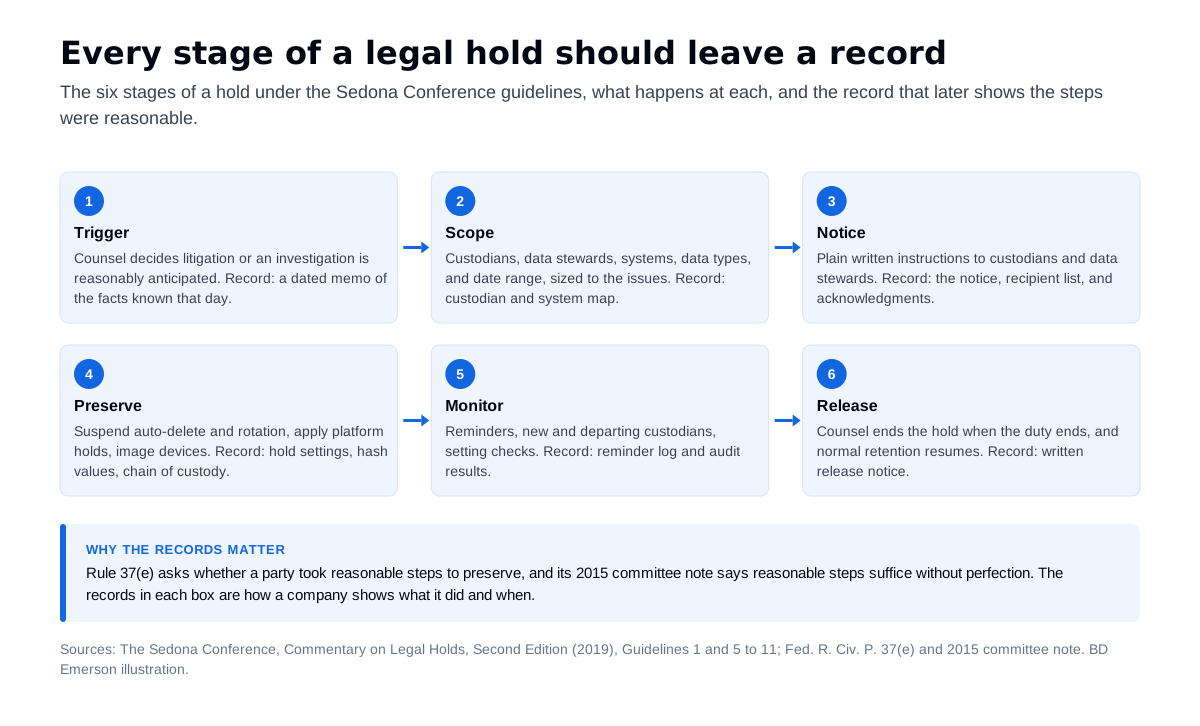
The figure is a sequence on paper, and in practice steps overlap. A breach or a fast-moving dispute can require preservation of logs and devices on the first day, before the notice is drafted.
How do you put a litigation hold on Microsoft 365?
Microsoft 365 has two hold mechanisms, and they cover different data. Litigation Hold is a setting on an Exchange Online mailbox. It preserves the mailbox, including items the user deletes or purges, original versions of edited items, and the archive mailbox, for a set number of days or indefinitely. It requires an Exchange Online Plan 2 license, or Plan 1 with Exchange Online Archiving, and Microsoft's admin documentation says the change can take up to 240 minutes to apply. In PowerShell, Set-Mailbox -LitigationHoldEnabled $true turns it on.
eDiscovery holds in Microsoft Purview reach further. A hold in an eDiscovery case covers OneDrive accounts and SharePoint sites as well as mailboxes, including the mailboxes and sites behind Microsoft 365 groups and Teams. Microsoft retired the classic eDiscovery (Standard) and eDiscovery (Premium) experiences on August 31, 2025, so case holds now run through the eDiscovery experience in the Purview portal.
Teams data is split across locations. One-to-one and group chats sit in each participant's mailbox; standard and shared channel messages sit in the team's mailbox, where Microsoft now also delivers private channel messages that once went to each member's mailbox; standard channel files sit in the team's SharePoint site, and private and shared channel files in their own sites; and files shared in chats sit in OneDrive. A hold on a user does not hold that user's teams, and a hold on a team does not hold its members. Under a hold, an edited message keeps every version. A retention policy that keeps all mail for seven years helps, but administrators can change it without knowing about the matter, so it does not replace a hold tied to the case and its custodians. A Microsoft 365 security assessment is a good time to check audit, retention, and hold settings before a matter forces the question.
How do Google Vault and Slack legal holds work?
In Google Workspace, holds live in Google Vault, which Google describes as preserving data "indefinitely for legal or other retention obligations." Holds can target accounts, organizational units, or groups, and for Gmail and Chat a hold can be limited to messages that match set conditions. Vault covers Google Chat messages only when conversation history is on, so check that setting for every custodian. The largest trap is offboarding: Google warns that deleting a user or a required license means their data "might be irreversibly purged and no longer available to Vault."
Slack legal holds are available on Enterprise plans and require the Legal Holds Admin role. A hold saves messages and files from the selected conversations "regardless of retention settings," including content members later edit or delete. Slack lists exclusions that matter in practice: messages and files from Slack Connect conversations, emoji reactions, and snippet version history are outside a hold, and if a held channel is deleted, its message and file data is not saved. Held data comes out through a JSON export or the Discovery API. On plans without legal holds, counsel should decide early whether retention settings and exports are reasonable steps for the matter.
What about phones, text messages, and ephemeral messaging apps?
Phones are a common weak point in a hold, because the data sits on a device the employee controls and some messaging apps delete by design. In Signal, for example, anyone in a chat can turn on disappearing messages, with custom timers of up to four weeks, and expired messages are deleted from the device.
Regulators treat this as a compliance question. The DOJ Criminal Division's Evaluation of Corporate Compliance Programs, last updated in September 2024, directs prosecutors to examine a company's policies on personal devices, communication platforms, and messaging applications, including ephemeral messaging, whether business communications can be preserved and accessed, and what happens to employees who refuse access. On September 27, 2022, the SEC charged 15 broker-dealers and an affiliated investment adviser with recordkeeping failures over business messages sent on personal devices, with penalties above $1.1 billion.
For a hold, that means three steps. The notice tells custodians to turn off disappearing timers for business conversations and to keep their devices. Company-owned phones get collected forensically before they are reset or reissued. Counsel decides how to handle personal devices under the company's device policy and with the employee's consent.
Which security logs expire before anyone sends a hold notice?
Security and cloud logs often answer the central questions in a dispute, and many of them roll off on fixed schedules regardless of any notice. These defaults come from each vendor's documentation as of October 2026.
| System | Default retention | How to preserve it | Common gap |
|---|---|---|---|
| Microsoft 365 unified audit log | 180 days in Audit (Standard); one year for Exchange, SharePoint, OneDrive, and Entra ID records in Audit (Premium) | Export the searches you need now; 10-year retention needs an add-on license and a policy | The 10-year policy is not retroactive, so it cannot recover records already gone |
| Microsoft Entra ID sign-in and audit logs | 7 days on the Free tier; 30 days with P1 or P2 | Route logs to Azure Monitor, a storage account, or a SIEM | Upgrading the license does not restore logs that have already expired |
| AWS CloudTrail event history | 90 days of management events, per Region | Create a trail or a CloudTrail Lake event data store | Event history shows management events only, so data events need a trail or event data store |
| Microsoft Defender for Endpoint | 180 days by default; advanced hunting queries reach back 30 days | Query and export the in-scope devices' data while it is inside the hunting window | Data is erased within 180 days after the contract ends |
Sources for the table: Microsoft's Purview auditing overview, its Entra ID data retention and Defender for Endpoint data storage pages, and the AWS CloudTrail event history documentation. Microsoft notes that Audit (Standard) logs generated before October 17, 2023 kept the older 90-day default.
What happens to a litigation hold during a data breach?
A breach creates a preservation duty at the moment IT most wants to wipe and rebuild. Reimaging an infected laptop, rebuilding a server from a clean image, or resetting a compromised tenant can destroy the evidence counsel will need to show what the attacker accessed. Preserve first, in the order the data disappears: memory and live system state where the response plan allows it, then disk images, then cloud and security logs before their windows close. NIST SP 800-86 advises that volatile data should often be acquired first, that analysts work on copies, and that hashing the original and the copy shows the data was not altered. Chain of custody records who held each item and when.
The 2015 committee note to Rule 37(e) recognizes events outside a party's control, naming "a malign software attack" among them, and the duty to take reasonable steps still covers everything the company does control. Counsel may want this work directed under privilege, as our Kovel agreement guide explains, while the incident response work contains the attack. Our guide to ransomware investigations covers the evidence that matters most in an extortion case.
How BD Emerson supports a legal hold
BD Emerson preserves and collects evidence under counsel's hold instructions, and counsel decides the scope. Our digital forensics team images laptops and servers, collects mobile devices, exports Microsoft 365, Google Workspace, and Slack data with each platform's own tools, and captures logs before their retention windows close, recording hash values and chain of custody for every item. We work with IT to suspend deletion settings for the custodians and systems in scope and document each setting, so the hold can be shown later. When a matter closes and counsel releases the hold, our data privacy consulting team can help bring retention schedules back in line with your privacy obligations.
Frequently asked questions
Is a legal hold the same as a litigation hold? A legal hold and a litigation hold are the same thing: the instruction to preserve information once litigation or a government investigation is reasonably anticipated. Vendors use both names. Microsoft calls its Exchange Online mailbox feature Litigation Hold, Slack calls its feature legal holds, and Google Vault calls them holds. In every case the substance is a written notice to custodians plus system changes that stop automatic deletion.
When should a litigation hold be issued? Issue the hold when litigation or a government investigation is reasonably anticipated, which usually comes before any suit is filed. The Sedona Conference describes the trigger as notice of a credible probability of litigation, including when the organization itself seriously considers suing. Common triggers include a demand or preservation letter, a regulator's inquiry, a discovered breach, a departing employee suspected of taking data, and a formal internal complaint. Counsel makes the call and should record the date and the facts.
How long does a litigation hold last? A litigation hold lasts until the duty to preserve ends, typically when the matter and any appeals are over or when counsel concludes the threatened claim will not be brought. The Sedona Conference guidelines call for a release process so normal retention can resume. Holds left open for years keep data the company would otherwise delete, so counsel should review open holds on a schedule and release each one in writing.
What should a litigation hold notice include? A litigation hold notice should describe the matter in plain terms, list the categories of information to keep and where they live, such as email, chat, files, phones, and paper, give the date range, tell recipients to suspend deletion and disappearing message settings, name a contact for questions, and ask each recipient to acknowledge it. The Sedona Conference also recommends periodic reminders. IT then applies matching system holds, because a notice alone does not stop automatic deletion.
Does Microsoft 365 Litigation Hold preserve Teams chats and OneDrive files? Litigation Hold applies to an Exchange Online mailbox, and Teams one-to-one and group chat messages are stored in participants' mailboxes, so a mailbox hold covers those messages. OneDrive files, SharePoint sites, and channel files sit outside the user's mailbox and need an eDiscovery hold in Microsoft Purview, which covers mailboxes, OneDrive accounts, and SharePoint sites. Standard channel messages sit in the team's own mailbox, which needs its own hold.
Can a company be sanctioned for failing to preserve data? A company can be sanctioned. Under Federal Rule of Civil Procedure 37(e), if electronically stored information that should have been preserved is lost because a party did not take reasonable steps, and it cannot be restored or replaced, the court can order measures to cure the prejudice. If the court finds intent to deprive the other side of the information, it can presume the information was unfavorable, instruct the jury to presume so, or dismiss the case or enter a default judgment.
If your counsel has issued a hold and you need the evidence preserved and collected, our digital forensics team can image devices, export Microsoft 365, Google Workspace, and Slack data, and document chain of custody to the scope counsel sets.

About the author