Cloud Migration Strategy: The 7 Rs, the Wave Plan, and the Business Case
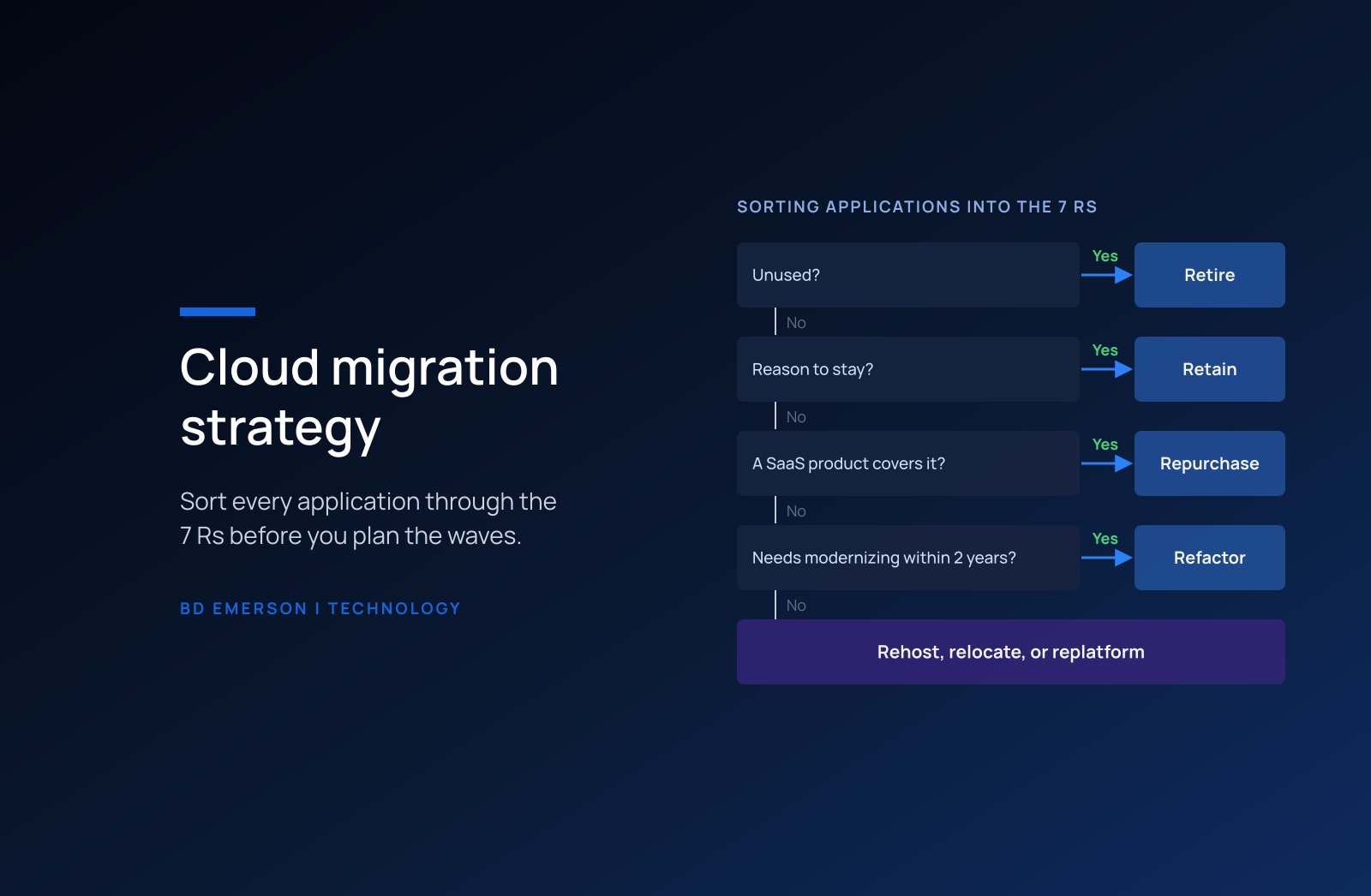
A cloud migration strategy is the plan that gives every application one of seven dispositions, known as the 7 Rs (retire, retain, rehost, relocate, replatform, repurchase, and refactor), groups the applications into migration waves, and ties each wave to a cost baseline and a business outcome. For a large estate, the defensible default follows AWS's own guidance: move most applications by rehosting, relocating, or replatforming them, retire what nobody uses, and modernize after the move, because refactoring in the middle of a large migration slows every wave behind it. The exception is any application that will need modernization within two years, which is the test Microsoft's Cloud Adoption Framework applies before it recommends a rehost.
What are the 7 Rs of cloud migration?
The 7 Rs are the standard vocabulary for migration decisions. AWS Prescriptive Guidance defines seven strategies. Microsoft's framework covers the same ground with eight names: it splits refactoring into refactor, rearchitect, and rebuild, calls repurchasing "replace," and has no separate relocate option. Whichever vocabulary you adopt, assign exactly one disposition to each application and record the reason, because the reason is what the steering committee will challenge.
| Strategy | What changes | Fits when | Watch for |
|---|---|---|---|
| Retire | The application is decommissioned or archived | Usage is negligible or another system already covers the capability | Retention and legal hold obligations on its data |
| Retain | The application stays in its current environment for now | Recently refreshed hardware, regulatory or latency limits, or no business case yet | Retained systems that never get a review date |
| Rehost | The application moves as is to cloud infrastructure, also called lift and shift | Stable workloads and a hard data center exit date | Existing performance and cost problems move with it |
| Relocate | Many servers move at once from an on-premises platform to the cloud version of the same platform | Large virtualized estates on a tight deadline | The old platform's licensing and operating model come along |
| Replatform | The application moves with targeted changes, such as a managed database or containers | Cutting operations work without rewriting code | Scope that drifts into refactoring |
| Repurchase | A different product, usually SaaS, replaces the application | Commodity functions with mature products | Data migration and process change |
| Refactor | The architecture changes to use cloud-native services | Strategic applications that change often and need to scale | Highest cost and longest timeline per application |
How do you choose the right R for each application?
Work through the dispositions in a fixed order, starting with the ones that take work out of the program. Retirement comes first because every application retired is one the program never has to move, test, or pay to run. Microsoft's criteria for retirement are practical: the workload has limited current or future business value, or the cost of migrating or modernizing it outweighs the business benefit. Usage and login data start that conversation with the business owner, and the owner's answer about month-end, year-end, and audit use settles it.
Retain comes next, for applications with a real reason to stay: hardware bought last year, data residency or latency limits, or a planned replacement that would make a move wasteful. Then test repurchase, because commodity functions such as HR, expense management, and IT ticketing seldom justify migrating custom or heavily customized software. Whatever remains splits between rehost, relocate, replatform, and refactor, and two facts decide that split: the date the current data center or hosting contract ends, and whether the application will need modernization within two years.
Should you migrate first and modernize later?
For most of the portfolio, yes. AWS's large migration guidance names rehost, replatform, relocate, and retire as the common strategies for large migrations and states that refactor "is not recommended for large migrations because it involves modernizing the application during the migration." The reasoning is about throughput. A refactor can take months for a single application, and a wave that waits on it stalls every application scheduled behind it.
Microsoft's Cloud Adoption Framework adds the guardrail. It warns against rehosting problematic workloads, because rehosting does not resolve existing performance, reliability, or architectural issues, and it asks teams to confirm that a workload will not require modernization within two years before they rehost it. If modernization is likely, Microsoft suggests refactoring or rearchitecting instead to avoid duplicate effort. Run that two-year test on every rehost candidate. The applications that fail it belong on a separate modernization track with its own funding and its own schedule, so they never hold the migration waves hostage, and the sequence in our legacy application modernization guide applies to them.
What does the business case need to show?
The business case needs a cost baseline for each application before the first wave moves, because savings that were never baselined cannot be proven later. The baseline includes hardware depreciation, data center space and power, software licenses and support, and the labor that runs the application today. Against it, model the target run cost after rightsizing and commitment discounts, the one-time cost of each wave, and the overlap period when the company pays for both the data center and the cloud. Write each wave's target in measurable terms. Microsoft's framework offers examples in that form, such as reducing infrastructure and licensing costs by 25 percent within 12 months for a replatformed workload.
The overlap is where cloud business cases most often break. Data center savings arrive on fixed dates: a lease expiry, a hardware refresh that no longer has to happen, a support contract that lapses. A migration that slips past one of those dates pays for both environments for another term. Software licensing deserves its own line in the model, because some publishers price the same product differently on shared cloud infrastructure than on hardware the company owns, and data transfer charges grow with every application that stays chatty with systems left on premises. Once workloads land, the levers in our cloud cost optimization guide keep the run rate from drifting back up.
How do you plan migration waves?
Waves come from dependencies. Network flow data collected across a full business cycle, including a month-end close, shows which applications talk to which databases and services. Applications that share a database or call each other heavily move together as one move group. Splitting a chatty pair across the data center and the cloud adds latency and transfer cost, and it is a common cause of performance incidents in the weeks after a wave.
The landing zone comes before wave one: identity, network connectivity, logging, security guardrails, and cost tagging, built once and inherited by every account or subscription. Keep the first wave small and low risk so the team can rehearse its cutover runbooks and rollback criteria, and let later waves grow as the runbooks mature. AWS's application portfolio assessment guide gives an indicative timeline for the planning itself: portfolio discovery and initial planning in roughly the first five weeks, assessment of prioritized applications in weeks six and seven, portfolio analysis and wave planning in weeks 8 to 14, and continuous assessment of each wave from week 15 until the migration ends.
Who should own the migration decisions?
Each disposition needs two signatures: the business owner of the application, who confirms what it is worth and when it can move, and an architecture lead, who confirms the target pattern. Finance signs the baseline. A small cloud platform team owns the landing zone and the standard patterns, so that the twentieth rehost looks like the first and every wave inherits the same identity, logging, backup, and tagging. When an application team wants an exception, such as a refactor in the middle of the migration program or a retain decision with no review date, the steering committee decides it in the open and records the cost of the exception against the business case.
Regulated workloads add a compliance owner to that list. Applications that hold payment card, health, or other regulated data need their control evidence rebuilt for the new environment before cutover, including logging, access reviews, encryption settings, and backup tests, so that auditors and assessors can trace each control to the cloud services that now carry it. Plan that evidence work into the wave itself, because a migration that moves the workload and leaves the evidence behind produces findings at the next audit.
Where do cloud migrations go wrong?
Five failure patterns recur. Programs rehost everything to hit a date and then pay more to run the same inefficiencies in the cloud. They migrate applications that should have been retired, which spends wave capacity on systems nobody needs. They discover dependencies during cutover instead of during planning. They start without a cost baseline and cannot prove the savings to the CFO. And they leave the source servers running after cutover, so the data center costs never fall.
Each of these is a planning failure, and each has a control. Run retirement reviews before wave planning, collect dependency data before defining move groups, set the cost baseline before wave one, and attach a decommissioning date to every cutover so that the old environment shrinks on schedule. Track those four controls at the steering committee alongside the wave dates, since a program can hit every wave date and still miss its business case.
BD Emerson builds cloud migration strategies from the portfolio up: we assign a disposition to every application with its owner, build the cost baseline and the wave plan, stand up the landing zone, and run the cutovers. Our cloud migration services page describes how an engagement runs.

About the author