Cloud Cost Optimization: The Levers That Pay Back First
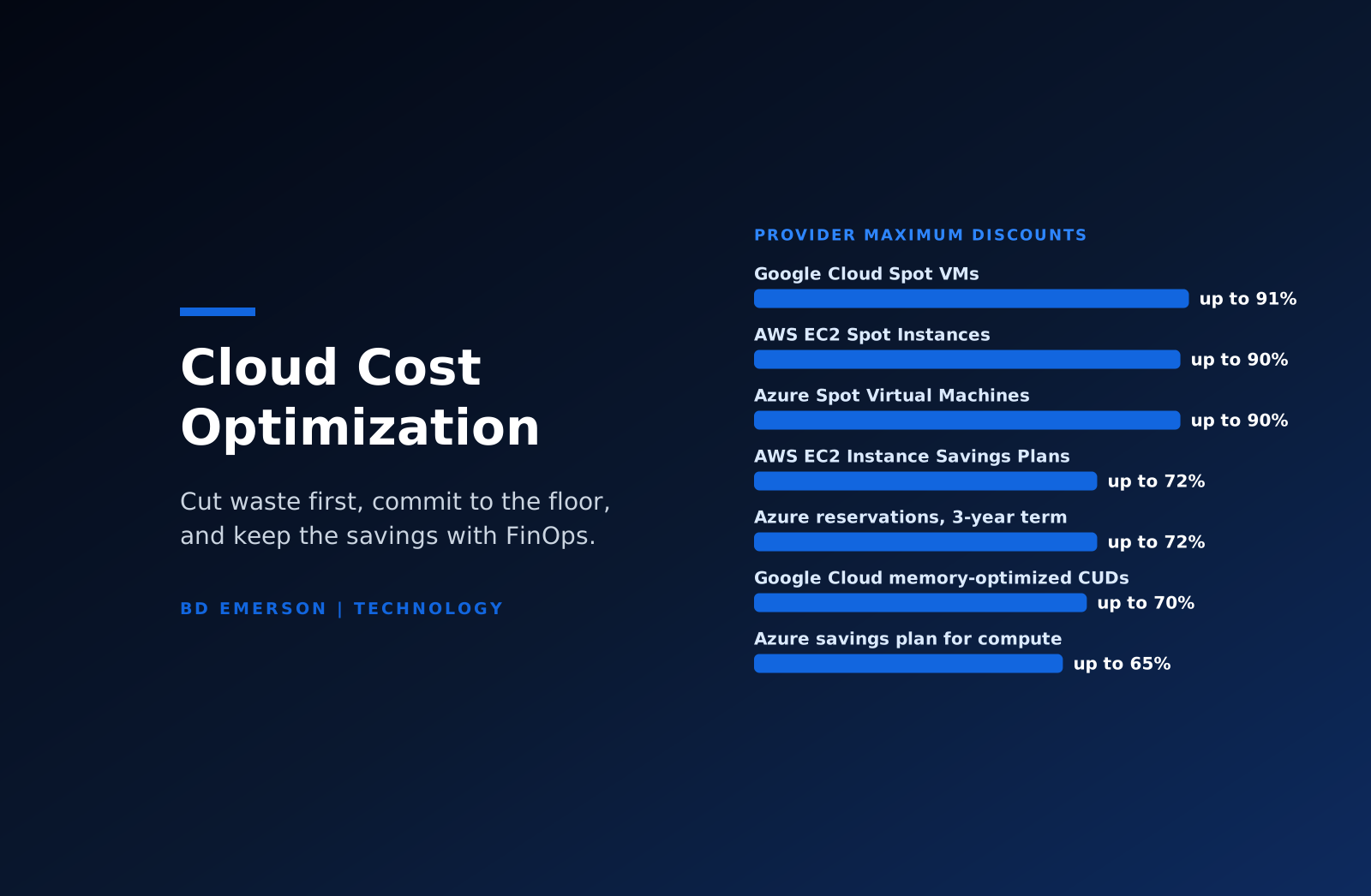
Cloud cost optimization lowers a cloud bill by removing waste first, then buying the remaining steady usage at a discount, then changing architecture where the cost is structural. In order of payback, that means deleting idle and orphaned resources, rightsizing what is left, covering the stable baseline with commitments, moving interruptible work to spot capacity, tiering storage, and fixing data transfer paths. The providers' own figures set the size of each lever: up to 72% off on-demand rates for AWS Savings Plans and Azure reservations, up to 70% for Google Cloud committed use discounts, and up to 90% on AWS and Azure and 91% on Google Cloud for spot capacity. Savings last only when someone owns them, which is the job the FinOps Framework organizes across engineering, finance, and business teams. The waste is real: Flexera's 2026 State of the Cloud Report estimates that 29% of IaaS and PaaS spend is wasted.
Which cloud cost levers pay back fastest?
The levers below run in rough payback order: the first ones cut cost within days with no contract and little engineering, and the last ones take design work. Discounts are the providers' published maximums against on-demand or pay-as-you-go prices, and the effort and risk ratings are our assessment.
| Lever | Provider figure or effect | Effort | Main risk |
|---|---|---|---|
| Idle and orphaned resources | Removes the charge entirely; AWS bills $0.005 per hour for every public IPv4 address, in use or idle | Low | Deleting a volume, snapshot, or bucket that holds logs or backups |
| Rightsizing | Azure Advisor recommends shutting down VMs with almost no CPU or network use and resizing others to cheaper SKUs | Low to medium | Sizing for an average week and missing month-end peaks |
| Commitments | Up to 72% (AWS EC2 Instance Savings Plans, Azure 3-year reservations); up to 70% (Google memory-optimized CUDs) | Low once usage is stable | Paying for capacity after usage drops |
| Spot and preemptible capacity | Up to 90% off on AWS and Azure; up to 91% on Google Cloud | Medium | Two-minute (AWS) or 30-second (Azure, Google Cloud) eviction notice |
| Storage tiering and lifecycle | S3 Intelligent-Tiering: 40% lower after 30 days without access, 68% lower after 90 | Low | Early deletion charges and archive retrieval measured in hours |
| Data transfer and egress | Cross-zone, cross-region, NAT gateway, and internet traffic each bill per GB | Medium to high | Architecture changes to production network paths |
| Bring your own license | Azure Hybrid Benefit: up to 80% for Windows Server and 85% for SQL Server against pay-as-you-go, per Microsoft | Low | Requires active Software Assurance or qualifying subscription licenses |
Two of the levers interact. A commitment priced against an oversized fleet locks the waste in for one to three years, so rightsize first and commit second. Kubernetes and AI workloads cut across every row and get their own treatment below.
What is FinOps, and who owns cloud costs?
The FinOps Foundation defines FinOps as an operational framework and cultural practice that maximizes the business value of technology, supports timely data-driven decisions, and builds financial accountability through collaboration between engineering, finance, and business teams. Its framework rests on six principles, among them that everyone takes ownership of their technology usage and that FinOps data should be accessible, timely, and accurate. The work cycles through three repeating phases: Inform, which shows the current state and allocates the spend; Optimize, which identifies improvements; and Operate, which gives people the means to make the changes and keeps the loop running.
We assign ownership along the framework's personas. Engineering owns usage and architecture. Finance owns forecasts, budgets, and approval of commitment purchases. Procurement owns provider contracts, product owners decide what each unit of spend should buy, and leadership sets the targets, while a FinOps practitioner runs the cadence among them. The scope keeps widening. In the FinOps Foundation's State of FinOps 2026 report, drawn from 1,192 respondents with more than $83 billion in annual cloud spend, workload optimization and waste reduction remained the top current priority, 98% said they now manage AI spend, 90% manage SaaS or plan to within a year, and 64% manage licensing. Our guide to SaaS spend management applies the same method to subscriptions. The bill itself keeps growing: Gartner's October 21, 2026 forecast puts worldwide infrastructure as a service spending at $292 billion in 2026, up 31.3%, and $367 billion in 2027.
How do you cut idle resources and rightsize workloads?
Waste removal pays back first because it needs no contract and no redesign. Flexera's 2026 survey of 753 cloud decision-makers and users put waste at 29% of IaaS and PaaS spend, the first increase after five years of decline, and 85% named managing cloud spend as their top cloud challenge. Start with resources that serve nothing: unattached block storage volumes, snapshots past their retention period, load balancers with no targets, and unused public IP addresses. Since February 1, 2024, AWS has charged $0.005 per hour for every public IPv4 address, attached or idle, which comes to about $44 a year per address. Then schedule non-production environments so that development and test systems stop outside working hours.
Rightsizing comes next, and each provider publishes recommendations. AWS Compute Optimizer covers EC2, Auto Scaling groups, EBS, and RDS and identifies idle resources such as unattached EBS volumes. Azure Advisor recommends shutting down VMs with almost no CPU or outbound network use and resizing others to a cheaper SKU. Two cautions apply. Advisor's default lookback is seven days, configurable up to 90, and a seven-day window misses month-end and quarterly peaks. Its savings estimates use retail rates and ignore reservations and savings plans, and Microsoft warns that following a cross-series recommendation can raise costs, depending on the SKUs your reservations cover.
How do AWS, Azure, and Google Cloud commitment discounts compare?
Commitments trade flexibility for a lower price on usage you are sure of. On AWS, Savings Plans commit to a dollar amount of usage per hour for one or three years. Compute Savings Plans save up to 66% and follow usage across EC2, Fargate, and Lambda in any region, while EC2 Instance Savings Plans save up to 72% within one instance family and region, matching Standard Reserved Instances. SageMaker Savings Plans reach 64%, and Database Savings Plans, a one-year commitment with no upfront payment, reach 35%. None of them reserves capacity.
Azure reservations save up to 72% on a three-year term for a chosen VM family, size, and region, and Microsoft's page states that reserved instances bought on or after February 1, 2027 will not support exchanges, which raises the cost of choosing wrong. The Azure savings plan for compute commits an hourly amount instead and saves up to 65% across VMs, App Service, Functions, and container services. Google Cloud's resource-based committed use discounts save up to 55% on most machine series and 70% on memory-optimized series, cover GPUs, and are shared across projects by default for billing accounts created on or after June 16, 2026.
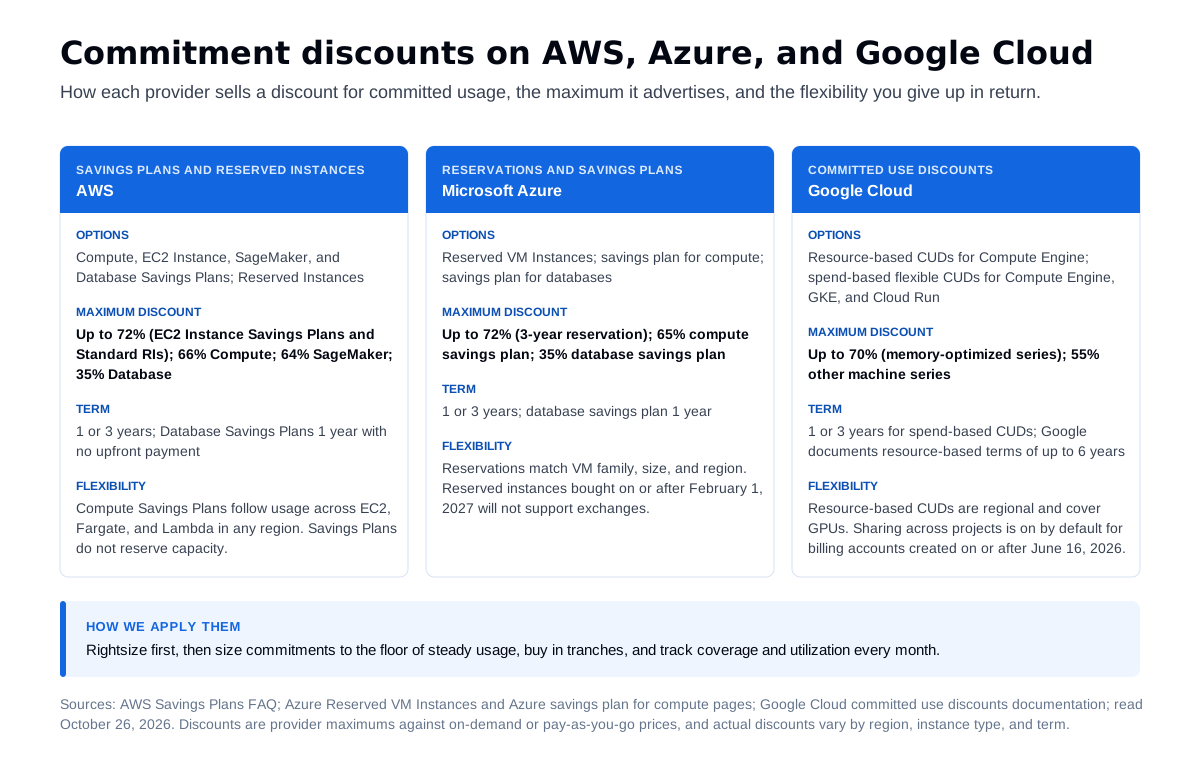
Size commitments to the floor of steady usage, the level it has not dropped below in recent months, and buy in tranches so coverage follows the fleet as it changes. Track two numbers every month: coverage, the share of eligible usage on a commitment, and utilization, the share of each commitment you use. Licenses are a commitment too. Azure Hybrid Benefit applies Windows Server and SQL Server licenses with active Software Assurance or qualifying subscriptions to Azure, and the benefit has to come off if Software Assurance lapses. Our guide to software license optimization covers how to establish what you own.
When should you use spot capacity?
Spot capacity sells a provider's unused compute at a deep discount in exchange for the right to take it back: up to 90% off on AWS and Azure and up to 91% on Google Cloud. The notice is short. AWS issues an interruption notice two minutes before it stops or terminates a Spot Instance, Azure gives 30 seconds through Scheduled Events, and Google Cloud gives 30 seconds. That rules out stateful databases and single-instance services. It suits batch processing, CI builds, rendering, data pipelines that checkpoint, and stateless web tiers in autoscaling groups that mix spot and on-demand capacity. In Kubernetes, a spot node pool can run interruptible pods while a smaller on-demand pool keeps critical services scheduled.
How do storage tiering and data transfer change the bill?
Storage grows until a policy moves or deletes data. S3 Intelligent-Tiering moves objects with no access for 30 consecutive days to an infrequent access tier that costs 40% less, and after 90 days to an archive instant access tier that costs 68% less, with no retrieval charges; objects under 128 KB stay at frequent-access rates. Azure Blob Storage offers hot, cool, cold, and archive tiers with minimum storage periods of 30, 90, and 180 days for cool, cold, and archive, prorated early deletion charges when data leaves sooner, and up to 15 hours to rehydrate archived data. Set lifecycle rules by data class and retention requirement, so legal holds and log retention survive the cleanup.
Data transfer behaves like a network bill. AWS includes 100 GB a month of free data transfer out to the internet across services and regions and then charges per GB by region. Traffic that crosses an Availability Zone or region boundary typically incurs a charge, and NAT gateways add a per-GB processing charge. Chatty services split across zones, backups copied across regions, and analytics tools pulling data from another cloud all land on this line. The fixes are architectural: keep services that talk constantly in the same zone where resilience allows, cache and compress, and process data where it lives. The same pattern drives data platform bills, as our guide to Snowflake pricing shows.
How do you allocate cloud costs to teams?
Savings stick when each team sees its own bill. Allocation starts with tags or labels for owner, application, environment, and cost center, enforced by policy when resources are created. On AWS, user-defined cost allocation tags appear in billing reports only after activation, and the keys can take up to 24 hours to appear and another 24 to activate, so activate the standard keys before you need the reports. Shared costs, such as support plans, networking, and shared clusters, need a written split rule.
Kubernetes needs its own method because one node hosts many teams. OpenCost, a Cloud Native Computing Foundation incubating project, allocates cluster costs down to the container. AWS split cost allocation data assigns EC2 instance costs to individual ECS tasks and EKS pods based on CPU and memory, and for EKS it includes GPU, Trainium, and Inferentia accelerators.
Showback reports each team's costs without charging them, and chargeback moves the cost into the team's budget. Start with showback and move to chargeback once teams trust the numbers. Unit economics come next: cost per customer, per transaction, or per model call puts spend beside the business result, which is the purpose of the framework's Quantify Business Value domain. Anomaly detection closes the loop. AWS Cost Anomaly Detection learns normal spending patterns, including trends and seasonality, and sends alerts by email or Amazon SNS above a dollar threshold you set. Billing exports in the FinOps Open Cost and Usage Specification (FOCUS), which AWS, Microsoft, and Google Cloud all produce, let one report cover every provider.
How do you control AI and GPU spend?
AI workloads bring two cost shapes: GPU capacity for training and hosting models, and per-token charges for model APIs that grow with every call. Commitments and scheduling apply to both. On AWS, EC2 Capacity Blocks for ML reserve GPU or Trainium instances for a future start date, for up to six months and up to eight weeks in advance, at prices that move with supply and demand, and SageMaker Savings Plans cut eligible SageMaker usage by up to 64%. Google Cloud's resource-based committed use discounts cover GPUs. For model APIs, Amazon Bedrock prices batch inference at 50% below on-demand for select models, and Microsoft Foundry sells provisioned throughput reservations for one month or one year. Reserved units unused in any hour are lost, and the reservation does not guarantee capacity, so deploy first and reserve second.
Scheduling matters more for GPUs than for any other resource. Shut down notebooks and development GPU instances outside working hours, send bulk jobs to batch endpoints, and route simple requests to smaller models, as our guide to smart model routing explains. Track cost per model call or per inference as the unit metric, and give AI spend its own line in the allocation model so it does not hide inside a shared platform budget.
Where do cost controls and security collide?
Cost tools need read access to billing and resource data, and the convenient role can be broader than the job. AWS's ReadOnlyAccess policy can read data in storage services such as S3 buckets and DynamoDB tables, and AWS points to ViewOnlyAccess, which lists resources and basic metadata without reading content, when you need a policy without data access. On Azure, Cost Management Reader is the minimum role for viewing costs at the subscription, resource group, or management group scope. Give a third-party FinOps platform the narrowest role that supports its features, assess it like any vendor with access to your environment, and log its activity like any other privileged integration.
Deleting idle resources without an owner is the second collision. A storage bucket that receives audit logs, a snapshot kept for a retention rule, or a standby database for disaster recovery can all look unused to a cost tool. Require an owner's sign-off for anything untagged, stop a resource and wait a set period before deleting it, and exclude log archives and backups from automated cleanup. Our cloud security assessment reviews identity, logging, and backup configuration alongside the cost work.
How does BD Emerson run cloud cost work?
BD Emerson runs cloud cost engagements in the order of the table above: waste first, then rightsizing, then commitments, then architecture. Through our IT cost optimization service, we start from billing exports and view-only roles, build allocation by owner and environment, and rank changes by savings, effort, and risk, with your engineers approving each change. Commitment purchases follow a coverage plan sized to the usage floor. Where saving money requires re-platforming, our cloud migration team plans the move. Security and compliance practitioners work in the same team, so cuts do not remove the logging, backups, or controls an auditor will test. We are vendor-neutral and do not resell cloud capacity, so a recommendation to commit, switch, or shrink carries no margin for us.
Frequently asked questions
What is cloud cost optimization? Cloud cost optimization is the practice of lowering cloud spending without reducing the performance or reliability the business needs. It removes idle and oversized resources, buys steady usage through commitments such as AWS Savings Plans, Azure reservations, or Google Cloud committed use discounts, moves interruptible work to spot capacity, and changes storage and network design where the cost is structural. A FinOps operating model keeps the savings from eroding.
What is FinOps? FinOps is an operating model for managing technology spending. The FinOps Foundation defines it as an operational framework and cultural practice that maximizes the business value of technology through collaboration between engineering, finance, and business teams. Its framework sets six principles, three repeating phases (Inform, Optimize, and Operate), and four domains of work, and it now reaches beyond public cloud to SaaS, licensing, data centers, and AI.
What is the difference between AWS Savings Plans and Reserved Instances? Both lower AWS prices in exchange for a one- or three-year commitment. Reserved Instances apply to the instance configurations you select, while Savings Plans commit to an hourly dollar amount and apply automatically to eligible usage. AWS says EC2 Instance Savings Plans match Standard Reserved Instances at up to 72% off On-Demand, and Compute Savings Plans offer up to 66% with flexibility across EC2, Fargate, and Lambda. AWS recommends moving to Savings Plans as Reserved Instances expire.
How much cloud spend is wasted? Flexera's 2026 State of the Cloud Report, a survey of 753 cloud decision-makers and users, estimates that 29% of IaaS and PaaS spend is wasted, the first increase after five years of decline. Your own figure comes from tagging and allocation: idle resources, oversized instances, and steady usage still billed at on-demand rates are the first places to look.
What is the difference between showback and chargeback? Showback reports each team's cloud costs back to it without moving money, so teams see what they spend. Chargeback bills those costs to each team's budget. Start with showback, because it builds trust in the allocation data, and move to chargeback once tagging, shared-cost rules, and forecasts are accurate enough that teams accept the numbers as theirs.
How do you reduce Azure costs? Start with Azure Advisor's shutdown and resize recommendations, using a lookback longer than the seven-day default so monthly peaks count. Then cover steady usage with reservations, at up to 72% off pay-as-you-go on a three-year term, or the savings plan for compute, at up to 65%. Apply Azure Hybrid Benefit where you hold Windows Server or SQL Server licenses with Software Assurance, move batch work to Spot VMs, and tier blob storage by access pattern.
If your cloud bill has grown faster than your usage, or commitments are coming up for renewal, our IT cost optimization team can allocate the spend, remove the waste, and build a commitment plan your engineers and finance team both sign off on.

About the author