Active Directory Security: The Five-Step Path to Domain Admin

Active Directory is thirty years old, sits under nearly every enterprise, and remains the single most productive target in internal penetration testing. Not because it is badly built, but because it accumulates. Every merger, every departed administrator, every service account created for a project that shipped in 2019 leaves a residue, and that residue is what an attacker actually exploits.
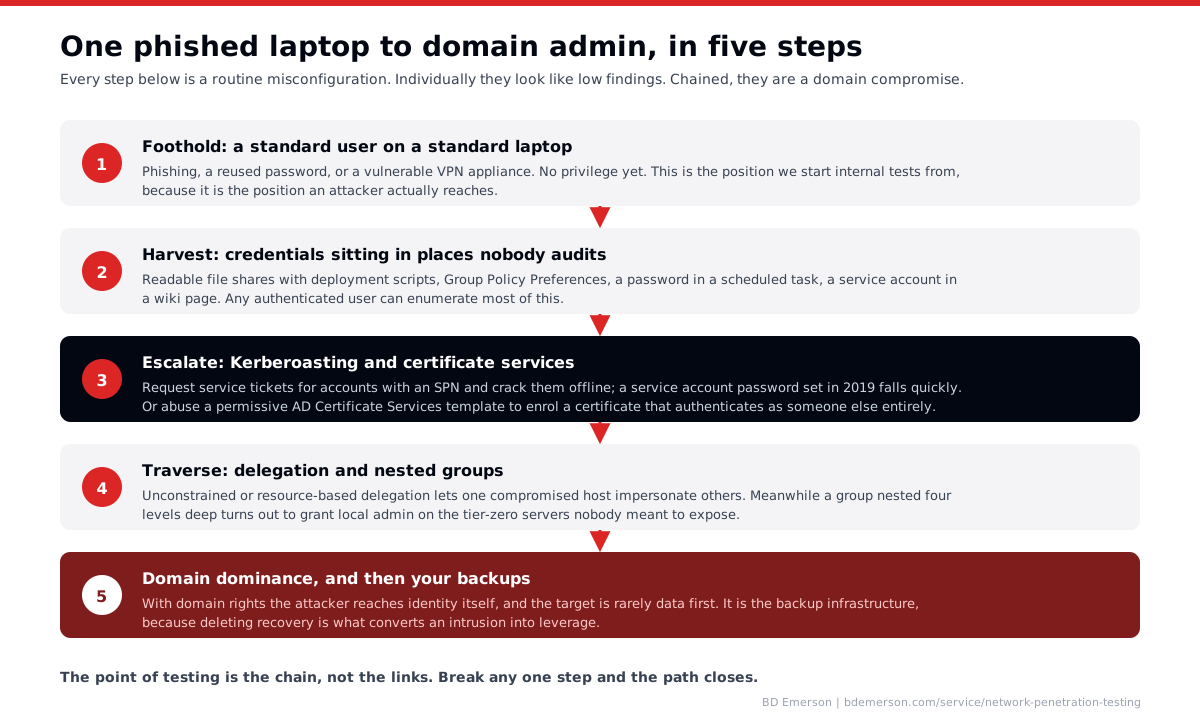
What follows is the path we walk in most internal engagements. Every step is a routine misconfiguration that would be rated Low or Medium in isolation. The chain is why severity is assigned on where it ends, not on how each link scores alone.
Step 1: the foothold you should assume
A standard user on a standard laptop. Phishing, a reused password against a service with no MFA, or a vulnerable remote access appliance. No privilege beyond what any employee has.
This is where we start internal tests, and it is worth insisting on, because assessments that begin from an administrative jump box answer a question nobody asked. Assume the foothold. The interesting question is what happens next.
Step 2: credentials in places nobody audits
Any authenticated user can read a surprising amount of the directory and a great deal of the file estate. What turns up, reliably: deployment scripts on readable shares with service credentials in them, Group Policy Preferences with stored passwords, scheduled tasks configured with a domain account, connection strings in application config, and a wiki page titled something like "new starter setup" containing a shared password.
None of this requires exploitation. It requires reading things the organization forgot were readable. This step is also the cheapest to fix, and fixing it well breaks the chain earlier than anything else on this list.
Step 3: escalation through Kerberos and certificates
Two techniques do most of the work here.
Kerberoasting. Any domain user can request a service ticket for an account that has a Service Principal Name, and part of that ticket is encrypted with a key derived from the service account's password. Take it offline and crack it at leisure with no failed logons and no lockouts. Service account passwords are frequently long-lived, human-chosen, and over-privileged, which is exactly the combination that makes this productive. The defence is not detection, it is making the passwords uncrackable: long random secrets, or Group Managed Service Accounts where the platform manages rotation.
Active Directory Certificate Services. If a certificate template lets a low-privileged user request a certificate and specify who it is for, that user can obtain a certificate authenticating as anyone, including a domain administrator. It is a configuration issue rather than a vulnerability, which is why it survives patching cycles, and it is one of the highest-impact findings still commonly present in mature environments. Audit your templates for who can enrol and whether the subject can be supplied by the requester.
Step 4: traversal through delegation and nesting
Kerberos delegation exists so a service can act on a user's behalf. Configured without constraints, it means compromising one host lets you impersonate anyone who authenticates to it. Resource-based constrained delegation is safer but can be abused where an attacker can write to an object's attributes.
Alongside that sits group nesting. A group four levels deep in another group turns out to grant local administrator on servers nobody intended to expose. This is rarely deliberate; it is what happens when access is granted by adding groups to groups over a decade. Tooling that maps effective permissions rather than declared ones is the only practical way to see it, and the output usually surprises the directory team.
Step 5: domain dominance, and then the backups
With domain rights an attacker owns identity itself. What matters is what they do next, and in real incidents the first target is rarely the data. It is the backup infrastructure, because destroying recovery is what converts an intrusion into leverage.
This is the argument for treating backup systems as tier-zero assets with separate credentials, and for testing whether a compromised domain admin can actually reach and delete them. In our experience that test fails more often than clients expect.
Where to spend first
In rough order of value per unit of effort: get service account passwords out of crackable range and move to managed accounts; audit certificate templates for enrolment rights and requester-supplied subjects; hunt credentials in shares, scripts, and Group Policy; separate backup infrastructure credentials from the domain; and only then work on the delegation and nesting cleanup, which is the most laborious and the least likely to be finished.
Detection deserves a mention too, because most of these techniques are visible if anyone is looking. Kerberoasting generates a distinctive ticket request pattern. Certificate enrolment is logged. The question is whether those logs reach somewhere that alerts, which is precisely what a purple team exercise measures.
Why this is an annual exercise, not a one-time fix
Active Directory drifts. New service accounts appear, an acquisition brings a trust relationship, someone grants a group temporary rights that become permanent. An environment cleaned thoroughly this year will have new paths next year. That is the case for testing internal networks semiannually rather than treating one clean report as a durable state, which we lay out in continuous vs annual penetration testing.
Where BD Emerson fits
Active Directory is a core part of our network penetration testing, tested from an assumed-breach position rather than from an administrative account, and we report the shortest path to domain admin plus the specific link that breaks it. Where the goal is to measure whether your team would notice any of this happening, that is a red team exercise, and the follow-on purple team work turns each successful technique into a detection you own.

About the author