MyChart Phishing: How Brand Impersonation Attacks Weaponize Trust
MyChart was not breached. Since July 2026, attackers have been sending emails and texts that impersonate Epic's MyChart patient portal, and none of it required touching Epic's systems. Two lures did the work: a "your recent results are ready" message that leads to a copied MyChart login page, and a free "2026 Medicare Health Kit" offer that ends in a credit card form. Epic's Trevor Berceau, director of research and development, told Healthcare Dive the uptick came from "scammers taking advantage of the popularity of the MyChart brand rather than any security concern." More than 40 health systems have since warned their patients. The campaign is a clean example of brand impersonation phishing, and the lesson reaches well past healthcare: the trust your customers place in your name is an attack surface, and most security programs have no owner for it.
What happened in the MyChart phishing campaign
Epic's MyChart team published a scam warning in late July 2026 after noticing a rise in fraudulent messages using the MyChart name. The American Hospital Association relayed the warning to its members on August 24. Over the following weeks Texas Health, Avera Health, Methodist Health System, Premier Health, Sentara Health, Penn Medicine, Summa Health, and dozens of other systems posted their own patient alerts, and the Pennsylvania Attorney General issued a consumer warning on August 28. Summa Health's September advisory counted more than 40 health systems that had warned patients by then.
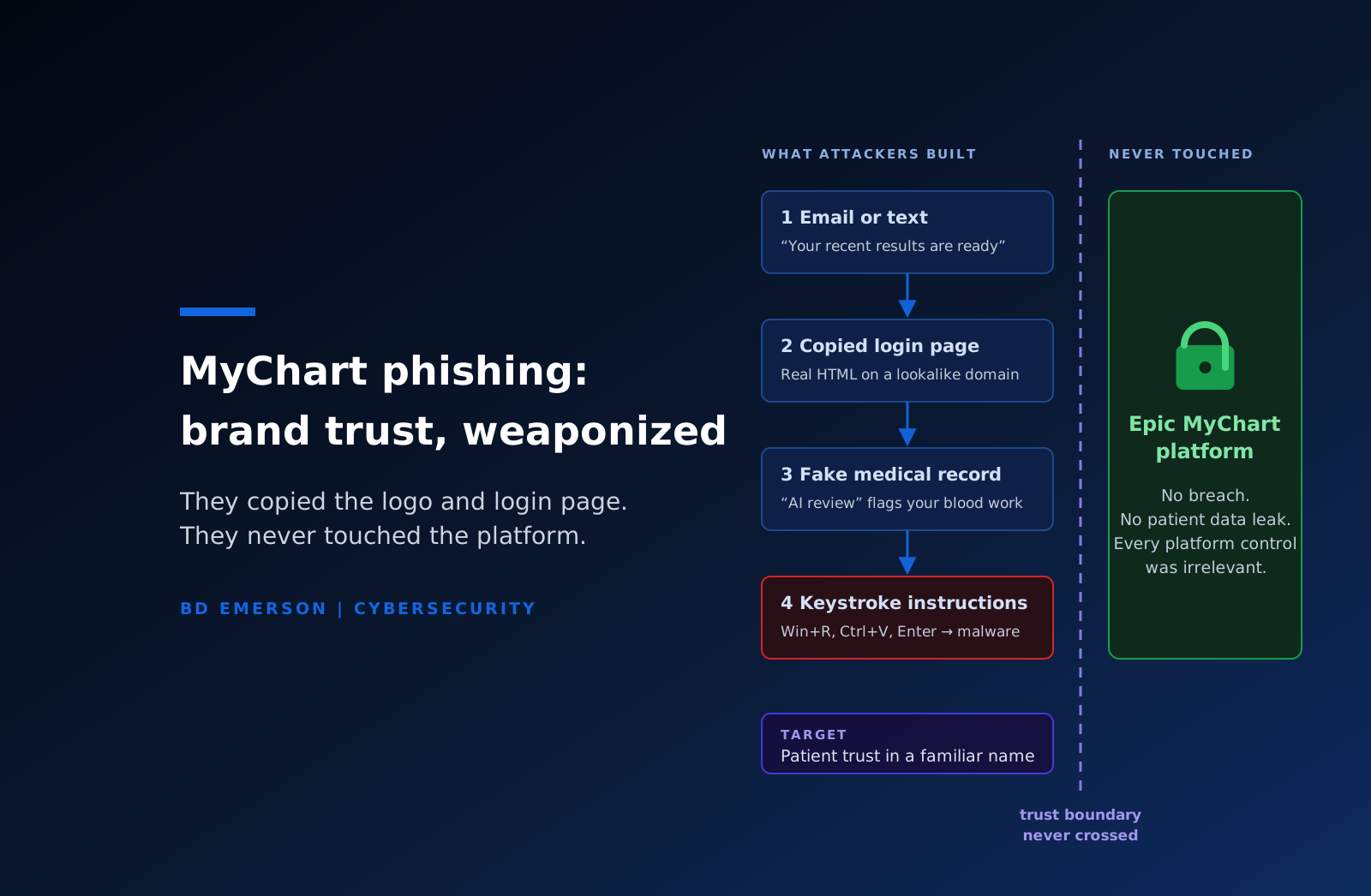
Epic's own guidance page documents two campaigns its security team investigated during summer 2026. The first is a credential theft and malware chain. The email says results are ready and links to a login page built from the real site's copied code. After the patient enters a username and password, the fake portal shows a fabricated medical record, and a pop-up says an "AI-powered review" found critical patterns in the patient's blood work. A "human verification" step then tells the patient to hold the Windows key and press R, press Ctrl and V, and press Enter. That sequence opens the Windows Run dialog and executes a command the site placed on the clipboard, which installs malware. Security researchers call this pattern ClickFix, and it works because the victim performs the installation by hand, so browser and email filters never see a malicious download. An August variant replaced the keystrokes with an "Unlock Full Report & See Diagnosis" button that downloads a program named Full_Analysis_Report.exe and coaches the patient through the Windows security warnings.
The second campaign is old-fashioned fraud with a new logo. The message promises a free Medicare kit or senior health package, routes through unrelated advertising sites, and lands on a MyChart-branded survey with a countdown timer. The survey collects personal information, then asks for a shipping fee, then asks for full card details. MyChart does not run giveaways.
Epic's guidance puts the core point in one line: "This is the attack. No website should ever ask you to type keyboard shortcuts to prove you are human." Epic also stated that MyChart will never ask for a password or verification code, will never ask a patient to change the email address or phone number on the account to one they do not control, and will never tell a patient to run a command to verify or unlock an account. Patients were told to keep using MyChart as normal.
Why this is brand impersonation rather than a breach
A breach means an attacker got into a system. Brand impersonation means an attacker borrowed a name, a look, and a set of expected communications, and used them against the people who trust that name. Nothing in the MyChart campaign touched Epic's infrastructure or any health system's portal. The attackers copied public HTML, registered domains, sent mail, and waited. Every control Epic runs on its platform was irrelevant, because the platform was never the target. The target was the patient's expectation that a message about lab results is real.
MyChart was chosen for three reasons, and each one applies to other brands. First, recognition: MyChart is the patient-facing name for hundreds of health systems, so the logo is familiar to a large share of American patients. Second, expectation: patients are used to receiving result notifications by email and text, so the lure matches a message they were already waiting for. Third, ambiguity built into the brand: because MyChart is licensed by many organizations, a patient cannot tell from the name alone which sender domain is legitimate. Premier Health had to tell its patients that real messages come from @premierhealth.com. Summa Health had to publish its exact portal URL. Every health system had to do its own version of this, and the attackers only had to get the logo right.
The fake lab result also shows how attackers use fear against the trust they borrowed. A patient who believes they are looking at their own critical blood work is not reading URLs. They are following instructions. That is why the campaign could get a careful person to open a Run dialog and paste an unknown command, an action nobody would take on a site they distrusted.
Your brand is an attack surface
The same conditions exist wherever customers expect to hear from you. A bank's fraud alerts, a payroll provider's pay stub notifications, a SaaS vendor's "action required on your account" emails, a university's financial aid portal, a utility's billing notices, a law firm's document-sharing links: each one trains customers to click, and each one can be copied from public pages in an afternoon. The same applies inside the company. A familiar support mailbox, an executive's name on a wire request, a vendor's invoice template, and a known contractor's calendar invite all carry trust that was earned by the real thing and is borrowed by the fake.
This is why phishing resistance cannot live only in the security team's email filter. The controls that matter for brand impersonation sit in security, marketing, customer support, legal, and fraud operations, and in most organizations none of those groups owns the problem end to end. Marketing owns the brand but not the sending domains. Security owns the domains but not the customer messaging. Support hears from the victims first and has no script. Legal handles takedowns but only when someone asks. The attacker works in the gaps between them.
How to prevent brand impersonation attacks
The defenses are known. What most organizations lack is a decision that this is a security problem with an owner, a budget, and a playbook. The controls below are the ones that would have blunted the MyChart campaign and will blunt the next one aimed at your name.
Publish the rules of your own communications. Epic's "MyChart will never" list is the model. State what you will never ask a customer to do, name the one domain you send from, and describe how you will contact them about account problems. Put it on your website, in onboarding, and in the footer of the messages themselves. A customer who has read the rule "we will never ask you to press keyboard shortcuts" has a specific reason to stop when a site asks them to.
Lock down the domains you own. Set SPF, DKIM, and DMARC on every sending domain, move DMARC to a reject policy, and apply the same to parked domains you never send from, because unprotected domains are the easiest ones to spoof. This stops exact-domain forgery. It does not stop lookalike domains, which is why the next control exists.
Watch for lookalikes and take them down. Register the obvious typos and hyphenated variants of your brand. Monitor new domain registrations and certificate transparency logs for your brand string, since attackers need a TLS certificate to make a login page look right. Give one person the authority to file takedowns with registrars and hosting providers the same day a lookalike appears, and track how long each one stays up.
Make stolen passwords worth less. The MyChart credential lure only pays if a username and password are enough to open the account. Phishing-resistant MFA, meaning FIDO2 security keys or passkeys, defeats a copied login page because the credential is bound to the real domain and will not work on the fake one. Where you cannot deploy it to customers yet, watch for the signals that a credential campaign is landing: password reset spikes, logins from new devices in the days after a phishing wave, and help desk calls about messages you did not send.
Give customers a place to report, and answer it. A monitored abuse mailbox, a scam alert page on your site, and help desk scripts for "I got a message that looks like it came from you" turn your customers into sensors. The health systems that came out of this well were the ones that posted a warning within days, with the exact sender addresses and portal URLs patients should trust.
Train your workforce on the customer side of phishing. Most security awareness training covers the employee as target. It should also cover the employee as first responder: what the front desk says when a patient calls about a Medicare kit email, how support verifies identity when someone reports a compromised account, and who gets told when three calls about the same message arrive in one morning.
Put brand impersonation in the incident response plan. Most plans trigger on a compromised system, so a campaign that compromises no system never reaches the plan. Add a scenario for it: who monitors, who decides to warn customers and how fast, who owns the communications template, who files takedowns and law enforcement referrals, and how you coordinate with a vendor whose brand you share. This is a natural scenario for a tabletop exercise, because the hard decisions are about communication and timing, and they belong to executives rather than engineers.
What healthcare organizations owe their patients after this
Health systems that license MyChart inherited the exposure without inheriting the brand. Two obligations follow. The first is patient-facing: publish your sender domain and portal URL, repeat them in every results notification, and staff the help desk for the call volume a national campaign produces. The second is regulatory. A patient whose MyChart credentials were stolen and used has had their protected health information accessed without authorization. HIPAA's breach notification rule asks whether that happened. It does not ask whose system was at fault, so Epic's platform being secure does not settle the question for the covered entity. Health systems should be reviewing portal access logs for anomalous logins since July, forcing resets on any account a patient reports, and running the four-factor breach risk assessment with counsel where unauthorized access is confirmed. The 2026 HIPAA Security Rule update raises the bar on risk analysis and workforce training, and a risk analysis that does not name patient portal impersonation as a threat is now out of date.
Where to start
Start by asking who in your organization owns the trust in your name. If the answer is nobody, that is the finding. BD Emerson's vCISO practice builds the ownership, the DMARC and domain monitoring baseline, the customer communication rules, and the incident response scenario as part of the security program, and we run the tabletop that tests whether the plan holds when the first patient, customer, or employee calls to ask whether a message is real. The attackers in the MyChart campaign never had to defeat a control. Make sure the next ones do.
About the author