How Snowflake Pricing Works: Credits, Editions, and Real Costs
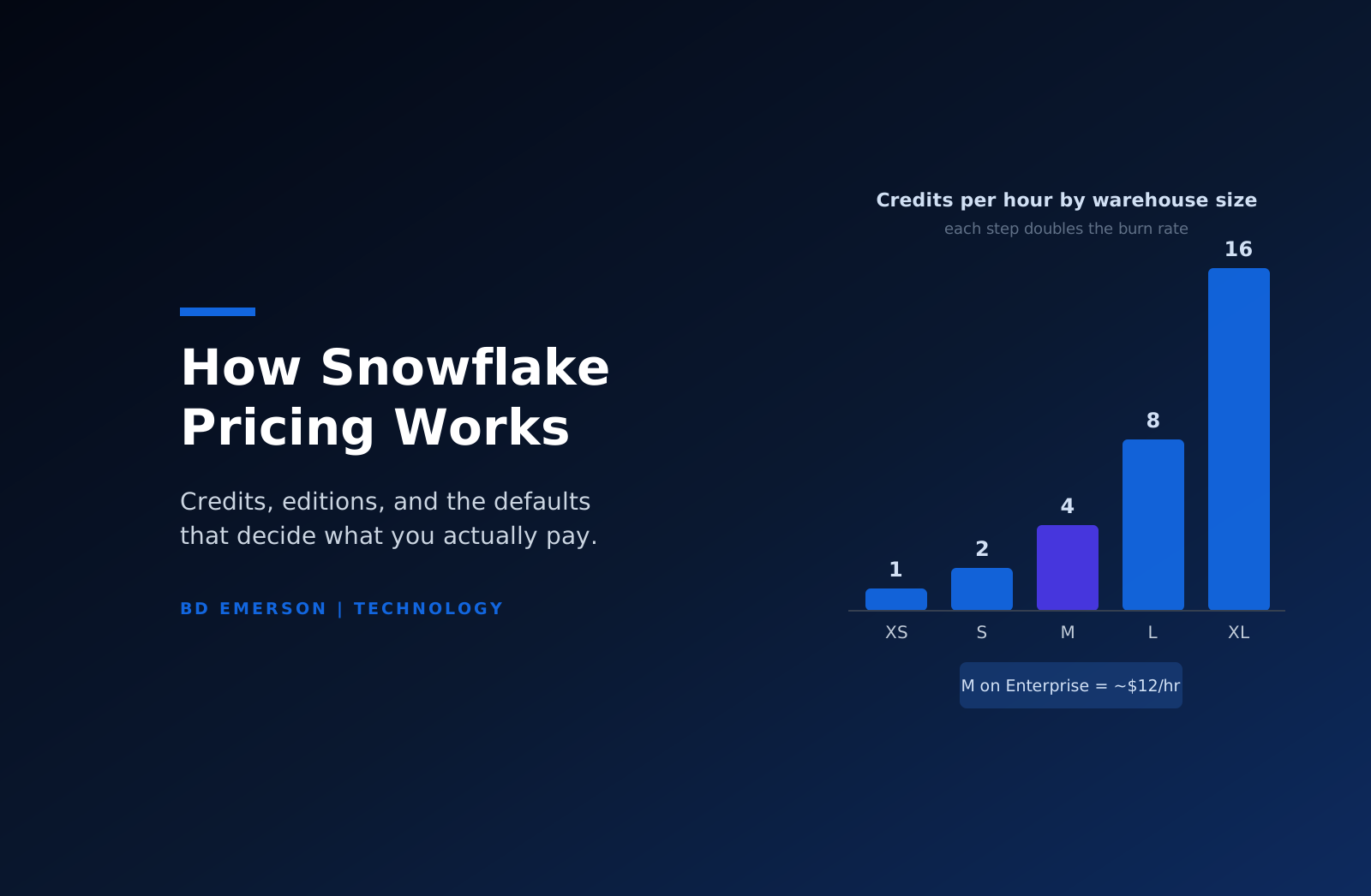
Snowflake pricing has three components: compute, storage, and data transfer. Compute is billed in credits, and the price of a credit depends on your edition and region. On AWS US East, list prices run about $2.00 per credit on Standard, $3.00 on Enterprise, and $4.00 on Business Critical, with Virtual Private Snowflake negotiated directly. A virtual warehouse burns credits by size: 1 credit per hour for an XS, doubling with each step up to 128 for a 4XL. Storage costs roughly $23 per TB per month on a capacity contract or about $40 on demand. For most customers, compute is 80 to 90 percent of the bill, which means warehouse configuration, not data volume, decides what you pay.
The credit is the unit, and the edition sets its price
Everything computational in Snowflake resolves to credits. A credit is an abstract unit that Snowflake converts to dollars at a rate set by three things: your edition, your cloud provider, and your region. The AWS US East figures above are the common anchors, but the same credit costs more elsewhere. Regional differences of 30 to 50 percent are normal, and companies that let each business unit pick its own region discover this at invoice time.
Edition selection deserves more attention than it usually gets. Standard covers the core warehouse. Enterprise adds multi-cluster warehouses, materialized views, search optimization, and 90-day time travel, and most mid-sized deployments end up here. Business Critical adds HIPAA and PCI eligibility, customer-managed keys, and failover, and its price applies to every credit you burn, not just the regulated workloads. Teams that need Business Critical for one compliance-scoped pipeline sometimes run a second, cheaper account for everything else. That split is an architectural decision with real money attached, and it is easier to make before the data lands than after.
Buying model matters too. On-demand rates are the list prices. Capacity contracts, where you pre-commit annual spend, price storage at the lower rate and discount credits by amounts that scale with commitment size. Discounts of 10 to 30 percent are common at mid-six-figure commitments, and larger deals go further. The figures in this article are list anchors; a negotiated contract will differ, and what drives the difference is your committed spend and your alternatives at renewal time.
Warehouses set the burn rate
A virtual warehouse is the compute cluster that runs your queries, and its size sets its consumption: XS burns 1 credit per hour, S burns 2, M burns 4, L burns 8, XL burns 16, and each further step doubles again up to 128 for a 4XL, with larger Snowpark-optimized sizes available for memory-heavy work. Billing is per second with a 60-second minimum each time the warehouse starts, and resizing triggers a fresh one-minute charge at the new rate.
The doubling table is where budgets go to die, because a size upgrade that makes a slow query finish in half the time costs exactly the same and feels free. It is only free if the warehouse then sits idle for less time. In practice teams size for their worst query and leave the warehouse there, which means every routine query runs on hardware priced for the exception. A Medium warehouse on Enterprise costs about $12 per hour while running. Left on for a 10-hour working day across a 22-day month, that single warehouse is roughly $2,600, before anyone has run a large job.
Auto-suspend is the control that matters most. A suspended warehouse costs nothing, and resume is fast enough that most workloads never notice. The default suspend timer is longer than most workloads need, and cutting it to 60 seconds on interactive warehouses is routinely the single largest saving available in an unoptimized account. The second control is separation: give loading, transformation, and BI their own warehouses so each can be sized and suspended on its own schedule instead of one warehouse being sized for all three.
Storage and transfer are smaller, until they are not
Storage is the simple line. Snowflake charges for compressed bytes stored, at about $23 per TB per month on capacity or $40 on demand in AWS US East. Time travel and fail-safe retention add storage you can see but not query, and long retention windows on high-churn tables can multiply the storage a table actually occupies. Even so, storage rarely leads the bill.
Data transfer can. Moving data within one region of one cloud is free. Crossing regions on the same cloud runs $20 to $140 per TB depending on the pair, and crossing clouds or egressing to the internet runs $90 to $150 per TB. Architectures that replicate data between a Snowflake account on AWS and consumers on Azure pay this tax continuously. If your data producers and consumers sit on different clouds, model the transfer line before committing the architecture, because it is the one Snowflake cost that behaves like a network bill rather than a database bill.
Serverless features and the cloud services rule
A growing share of Snowflake spend comes from features that consume credits without a warehouse: Snowpipe ingestion, serverless tasks, dynamic tables, the search optimization service, and Cortex AI functions all meter their own consumption. Each is individually reasonable and collectively unbudgeted, because they do not appear in the warehouse-level dashboards teams watch. Cortex deserves specific attention: LLM functions are priced per million tokens on top of compute, and an enthusiastic analyst pointing an LLM function at a large table can produce a line item nobody forecast.
Cloud services, the coordination layer that parses queries and manages metadata, is billed only where daily usage exceeds 10 percent of that day's warehouse consumption. Most accounts never cross the threshold. Metadata-heavy patterns do: thousands of small queries, aggressive information-schema polling from observability tools, and frequent cloning can all push cloud services into billable territory.
Where the money actually leaks
Snowflake overspend usually accumulates from defaults left in place: warehouses sized for the worst query and never revisited, suspend timers at their default, development environments running around the clock, retention windows set to maximum on tables that churn, and serverless features adopted one at a time with nobody summing them. The pattern across cost reviews is consistent enough to treat as a checklist: right-size warehouses down until something objects, cut suspend timers, separate workloads, cap retention on high-churn tables, and put the serverless lines on the same dashboard as the warehouses.
Visibility is the precondition for all of it. Snowflake ships the instruments: resource monitors that suspend a warehouse or notify when consumption crosses a threshold, budgets that track spend against a target, and the ACCOUNT_USAGE views that let you attribute credits to warehouses, users, and individual queries. Most accounts have none of them configured. A practical baseline is one resource monitor per warehouse with a notification threshold, query tagging so dbt runs and BI refreshes are attributable to a team, and a weekly report of the ten most expensive queries. That last report is reliably uncomfortable and reliably useful, because the top ten usually contains at least one query nobody remembers writing.
Query efficiency is the deeper lever. A transformation that scans a full table hourly when it could process increments is burning credits at any warehouse size, and no amount of configuration fixes a query pattern. This is where cost work stops being administration and becomes engineering.
How this compares, and when to look at alternatives
Snowflake's model prices convenience: the platform manages the infrastructure, and you pay through the credit meter. Databricks prices the same convenience differently, with DBU rates that vary by workload type and a compute layer that runs in your own cloud account. Which comes out cheaper depends on workload mix, and the honest answer is that either platform can win a given comparison. We keep a detailed side-by-side in our Databricks versus Snowflake enterprise comparison, and for teams that have already decided to consolidate on the lakehouse, our Snowflake to Databricks migration guide covers what the move actually involves.
Before any migration conversation, get the current bill under control. Most of the savings available in a Snowflake account require no platform change at all, just the configuration and query work described above. BD Emerson's data platform consulting practice runs cost assessments on both platforms, and the first deliverable is usually a ranked list of changes worth making regardless of where the data lives. The platforms will keep repricing against each other. A workload that is engineered efficiently is cheaper on either one.

About the author