Unity Catalog Migration Explained
Unity Catalog replaces workspace-scoped hive metastore governance with an account-level metastore, a three-level namespace of catalog, schema, and object, automatic lineage, and one permission model covering tables, files, models, and dashboards. Migration runs 8 to 20 weeks for a mid-sized estate and two to four quarters for a large one. Roughly 20 percent of the work is moving tables and 80 percent is identity, storage credentials, permission mapping, and code changes. The order that works: enable the metastore, move identities to the account level, define external locations, mirror existing tables read-only, cut writers over pipeline by pipeline, then decommission the hive metastore on a date agreed in advance.
What Unity Catalog actually changes
Governance moves out of the workspace. A metastore lives at the account level for a region and attaches to workspaces, so a privilege granted once applies everywhere instead of being recreated per workspace. Workspace administrator status no longer implies data access, which is the change that generates the most surprise and the most complaints.
Identity moves to the account. Users, groups, and service principals become account-level objects federated from your identity provider. Workspace-local groups have to be converted, and a group with the same name in three workspaces is three unrelated groups until someone does that work.
The object model widens. Tables, views, volumes for non-tabular files, functions, registered models, and vector indexes sit under the same grant model. That is the real argument for the migration: one place to answer who can read what, across every object type rather than tables alone.
Lineage and audit become automatic. Column-level lineage is captured from queries rather than assembled by a separate cataloging tool, and system tables give you queryable audit and billing history. Both are difficult to reconstruct after the fact, which is a reason to move sooner rather than later.
The three-level namespace, and what it breaks
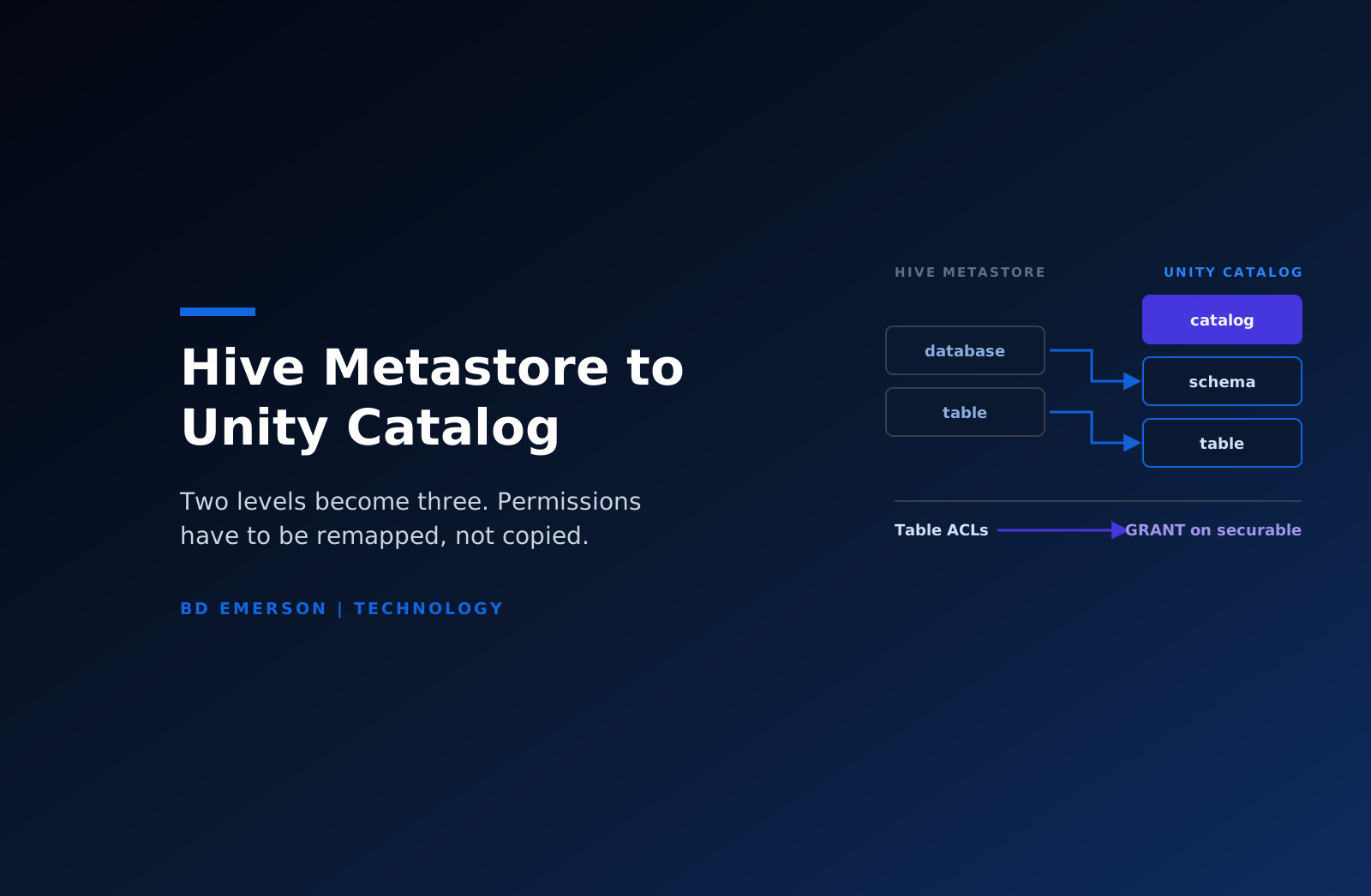
Two-part names under the legacy metastore become catalog.schema.object. The extra level is how you separate environments or business domains cleanly, with development, staging, and production as sibling catalogs rather than naming conventions inside one schema. It is the best part of the change.
It also breaks every hard-coded two-part reference in notebooks, jobs, dbt profiles, BI connections, and saved queries. Path-based reads break too. Mount points under the legacy file system and direct storage paths are not governed by Unity Catalog and should be replaced with external locations and volumes, which means the notebooks referencing them get rewritten rather than repointed. In most estates the code change surface is larger than the data surface, and teams that budget for tables and not for references run late.
Compute is part of the project as well. Legacy clusters running without isolation cannot access Unity Catalog data at all, older runtime versions are unsupported, and initialization scripts and libraries need to come from governed locations. A cluster policy review belongs in the plan whether or not anyone scoped one.
Migrating off the hive metastore
For external tables, where the data already sits in your own object storage, the upgrade is a metadata operation. Create a storage credential, define an external location covering the path, then register the table with SYNC. Because SYNC can be re-run, you can hold a read-only mirror current in Unity Catalog while writers still point at the legacy metastore. That property is what makes a phased cutover possible instead of a weekend cutover with a rollback plan nobody trusts.
Managed tables are different. Unity Catalog managed tables live in the metastore's own managed storage, so legacy managed tables need a deep clone or a create-table-as-select, which means copying data, paying for storage twice during transition, and scheduling a real window. Inventory managed against external tables in week one, because that ratio sets the timeline more than table count does.
Views need separate attention, since their definitions embed two-part names. Legacy functions may need rewriting. Anything relying on direct file access patterns that Unity Catalog does not allow has to be redesigned rather than registered.
Where permission mapping goes wrong
Missing parent privileges. A grant on a table is not sufficient, because the principal also needs usage on the catalog and the schema above it. This one item accounts for most access tickets in the first week after any cutover, and it looks like a bug rather than a design gap.
Individual users as owners. Owners hold implicit rights on their objects, so a table owned by someone who has left the company becomes a change request that needs escalation. Assign groups as owners from the beginning.
Path grants that no longer exist. Legacy patterns granting access to arbitrary files disappear. Jobs reading paths directly need explicit privileges on an external location, and finding all of them requires a query log review rather than a survey of the teams.
View-based masking that should now be a policy. Row filters and column masks replace the practice of maintaining a parallel set of restricted views. Porting those views one to one carries the old maintenance burden into the new system for no benefit.
Write the mapping as a reviewed document, have whoever approves access requests today sign off on it, and generate grants from that document rather than by hand at a terminal.
A phased rollout
- Weeks 1 to 3, foundation. Create the metastore, federate identity to the account, convert workspace-local groups, and define storage credentials and external locations over existing paths. No data moves in this phase.
- Weeks 3 to 6, read-only mirror. Register external tables into a catalog, leave writers on the legacy metastore, and let analysts query the new namespace. Nothing is at risk, and the permission model gets tested by real users doing real work.
- Weeks 5 to 12, writer cutover. Move pipelines one at a time, least critical first, updating references and cluster configuration as you go. Run each pipeline through a full cycle in both places before switching its consumers.
- Weeks 8 to 16, managed tables and code. Clone legacy managed tables, replace mounts with volumes, and work through the hard-coded reference list across notebooks, jobs, and BI tools.
- Weeks 14 to 20, decommission. Revoke legacy access, hold the old metastore read-only for a defined period, then remove it. Skipping that freeze window is how teams find the one quarterly job nobody documented.
What it enables for AI workloads
This is the part that justifies the project to people outside the data team. Once models, feature tables, and vector indexes are governed objects in the same namespace as the tables they were built from, three things get easier. Training data has lineage, so the question of which columns fed which model version is a query rather than an investigation. Access to a model, an index, or a tool an agent calls is granted the same way as access to a table, so the AI permission question stops being a separate design exercise. And audit history lands in system tables, which is exactly the evidence an AI governance program needs and the hardest thing to produce retroactively. For how that layer fits together, see the Databricks enterprise AI stack.
How long it takes, and what stalls it
A single-workspace estate with mostly external tables runs 6 to 10 weeks. A mid-sized estate across several workspaces with a mix of managed and external tables runs 8 to 20 weeks. A multi-region enterprise with substantial legacy code runs two to four quarters, and the binding constraint there is code change and coordination rather than anything technical.
Three patterns stall these programs. Attempting a big-bang cutover instead of running a read-only mirror, which throws away the only safe rehearsal you get. Leaving jobs on legacy cluster configurations, so a portion of the estate cannot see the new catalog and the migration is judged broken. And dual writing to both metastores for convenience, which creates divergence that surfaces during a reconciliation weeks later.
If a broader platform move is underway at the same time, sequence Unity Catalog first. It is the foundation everything else sits on, which is why it belongs in phase zero of a Snowflake to Databricks migration rather than in a cleanup phase at the end.
Where BD Emerson fits
Our Databricks consulting team runs these migrations starting from two artifacts: an inventory that separates managed from external tables and a written permission mapping reviewed by whoever owns access approvals today. Those two documents determine the timeline and prevent most of the failures above. From there our data engineering practice works the phases alongside your engineers, including the unglamorous reference-rewriting work, because the estate has to be operable by your team after we leave.

About the author