Microsoft 365 Copilot Security: Get the Tenant Ready First
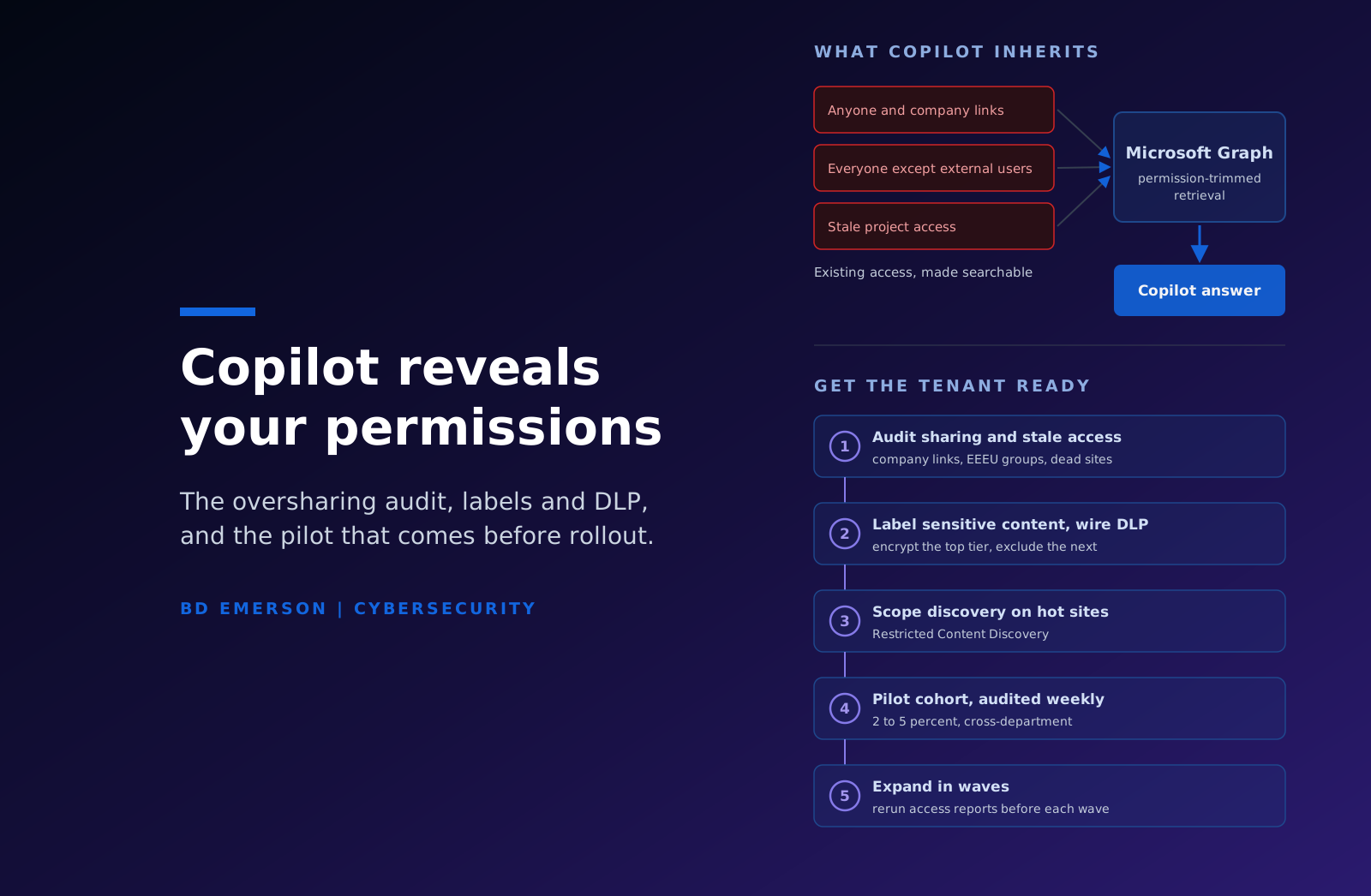
Microsoft 365 Copilot enforces the permissions your tenant already has. It retrieves content through the Microsoft Graph, so it can only surface what the signed-in user could already open. The security work sits in what those permissions actually allow, because most tenants carry years of quiet oversharing that stayed harmless only because nobody could find anything. Copilot removes the finding problem. A compensation file shared to "Everyone except external users" in 2021 becomes a one-line prompt in 2026. Tenant readiness therefore means five things, in order: audit sharing before rollout, label sensitive content, wire Purview DLP to those labels, scope discovery where cleanup is unfinished, and expand from a pilot cohort whose interactions you audit. This article walks through that sequence.
Two products share the Copilot name
Budget conversations go wrong when these get mixed. Microsoft 365 Copilot is the assistant inside Word, Excel, Outlook, PowerPoint, and Teams, grounded in your tenant's own content through the Microsoft Graph and licensed per user. Microsoft Security Copilot is a different product for security operations teams: an AI assistant that works across Defender, Sentinel, Intune, and Entra telemetry, purchased through provisioned Security Compute Units rather than per-user seats. One helps your workforce write, summarize, and search. The other helps your SOC investigate.
Search results blend the two, so be precise about which one you are evaluating. This article covers the first: getting a tenant ready for Microsoft 365 Copilot so the assistant does not surface content that was never meant to travel.
Copilot inherits permissions through the Graph
When a user prompts Copilot, the service retrieves candidate content through the Graph: the user's OneDrive, SharePoint sites where they hold access, mail and Teams messages they can read, and files shared with them. Retrieval runs against the semantic index Microsoft builds over tenant content, and it is permission-trimmed at query time, so Copilot grants no access that did not already exist. Microsoft's security model here is sound, and it is also exactly the problem.
Before Copilot, overshared content was protected by friction. Finding a sensitive file required knowing it existed, guessing where it lived, and searching for it on purpose. Copilot deletes that friction. It searches everything the user can touch, every time, and synthesizes what it finds. The distance between "could technically open" and "will be shown in an answer" is where the entire risk lives. There is also an aggregation effect, since one answer can assemble fragments from a dozen marginally shared documents into a picture no single file contained.
The rollout question is therefore an access governance question: how much of the tenant can each pilot user reach, and how much of that reach was intentional?
The pre-rollout audit
Four targets, in descending order of yield.
Company-scope sharing links come first. Every "People in your organization" link grants tenant-wide access to whoever holds the URL, and years of them accumulate silently. Enumerate them, expire the stale ones, and tighten default link types on sites whose defaults are broader than their content warrants.
Second, search site memberships and the groups nested inside them for "Everyone except external users." It appears in old intranet permissions, in site templates, and in groups someone created in 2019. Every occurrence on a site holding HR, finance, legal, or deal content is a finding.
Third, stale permissions: project sites that outlived their projects, memberships that outlived reorganizations, and shares created by people who have left. Inactive sites are the cheap win here, because archiving or deleting them retires their permission debt in one move.
Fourth, inventory unlabeled content in the stores that matter, because the controls in the next section act on labels, and unlabeled content is invisible to them.
On tooling, SharePoint Advanced Management's Data Access Governance reports show which sites are overshared and why, and as of early 2025 a single Microsoft 365 Copilot license in the tenant activates SharePoint Advanced Management, so the reporting is already paid for. You will not fix everything before rollout, and you do not need to. Rank sites by sensitivity times reach and clean in that order. A structured Microsoft 365 security assessment covers this audit alongside the identity and configuration review it belongs with.
Purview labels and DLP do the enforcement
Sensitivity labels are what let policy act on content, so keep the taxonomy small enough to use: three to five labels with names a salesperson can apply correctly on the first try. Auto-labeling handles the backlog at a scale manual classification never will, and label inheritance means a document Copilot drafts carries the highest-priority label of the content that grounded it.
Labels give you two Copilot-specific controls. Content protected with label encryption is only used in a response when the user holds sufficient usage rights, so your most restricted tier defends itself. And Purview DLP includes a policy location for Microsoft 365 Copilot, which blocks content carrying specified labels from being processed into answers at all. The pattern that works: encrypt the top tier, exclude the second tier from Copilot processing through DLP, and let labeled general content flow.
Deciding what counts as sensitive is the unglamorous prerequisite, especially where regulated data is involved. Mapping personal data, health information, and payment data into the label taxonomy is data privacy work, and tenants that skip it end up with labels that describe the org chart instead of the risk.
Restricted SharePoint Search is a stopgap with an expiration date
Microsoft built Restricted SharePoint Search for tenants that wanted Copilot before their cleanup finished. Enabled, it limits organization-wide search and Copilot grounding to an allowed list of up to 100 curated sites, while users keep their own OneDrive files, content shared directly with them, and files they recently worked with.
The costs are real. Copilot answers degrade because grounding shrinks to the allowed list. Search regresses for every user in the tenant, including people who were never licensed for Copilot. And someone owns the curation of that list indefinitely, which on a large tenant becomes a standing meeting nobody wants.
It is also going away. As of mid-2026, Microsoft has the feature on a retirement path and blocks new enablement starting July 31, 2026. The replacement direction is Restricted Content Discovery, part of SharePoint Advanced Management, which hides specific sites from tenant-wide search and Copilot grounding without touching anyone's direct access to those sites. Applied to the known-sensitive sites while the audit works through them, it is the better version of the same idea: per-site, surgical, and still supported. Tenants that already enabled Restricted SharePoint Search should plan the migration now rather than wait for a forced date. Either way, discovery controls contain the symptom and repair no permissions, so treat them as time bought for remediation rather than as remediation.
Audit what Copilot actually touches
Copilot interactions are auditable, and the audit trail is the fastest oversharing detector you will get after rollout. Microsoft Purview Audit records an event for each interaction, including references to the files that grounded the response. Audit Standard retains those events for 180 days and Audit Premium for one year by default. The prompt and response text is stored in the user's mailbox, where eDiscovery, retention policies, and legal hold apply to it like any other communication record.
Use the trail three ways during the pilot. Review referenced-file patterns weekly, because a restricted document appearing as a reference in answers for people outside its team means inherited access is doing exactly what you feared, and the specific file tells you which site to fix. Watch the inbound direction too, since prompts are a place regulated data leaks into: a user pasting a customer's health record into a prompt is an incident, whatever the answer says. Then confirm the DLP policy is firing by testing prompts against seeded labeled content, rather than assuming the policy works because it saved without error.
If your security operations team lives in a SIEM, forward the Copilot audit events there. That puts AI activity into the same detection and retention pipeline as sign-in and mailbox telemetry, and it outlasts the default audit windows without a separate export project.
Roll out in phases, starting with a cohort you watch
License a pilot of roughly 2 to 5 percent of the eventual seat count, drawn from several departments on purpose, including at least one high-sensitivity function such as finance or HR. A pilot built only from IT volunteers proves nothing about inherited access, because IT already knows what is overshared. Gate entry on the audit: the sites that cohort touches most get the sharing review and the labels first.
Give the cohort two things in writing before day one: an acceptable use policy that says what may and may not go into a prompt, and twenty minutes of training that covers it. The policy matters less for what it prohibits than for establishing that prompts are corporate records, subject to the same discovery and retention as email, which changes behavior on its own.
Run the pilot for 30 to 60 days. Each week, review the interaction audit, triage oversharing findings like incidents, and log what was remediated. Track value alongside risk, because a pilot that surfaces no security findings and no productivity gain has still failed, just differently. Expansion is earned when three things hold: oversharing findings on the pilot's sites trend toward zero, the sensitive stores those users touch carry labels with DLP verified against them, and interaction auditing happens on a schedule rather than in theory. Then expand in waves by department, rerunning the Data Access Governance reports before each wave, because sharing debt regrows as fast as people share.
Our Microsoft Copilot consulting practice runs this sequence end to end, from the pre-rollout audit through pilot instrumentation to full deployment. The rollouts that go smoothly all start the same way: with the tenant, and with the assumption that Copilot will faithfully expose whatever the last decade of sharing decisions left behind.

About the author