n8n vs Zapier vs Make: Which Automation Platform Fits
Pick Zapier when run volume is modest and the job is connecting many SaaS tools quickly. Pick Make when workflows branch and transform heavily and you want the most logic per dollar in a cloud platform. Pick n8n when volume is high, your team is comfortable with a more technical tool, or the data cannot leave your environment, because n8n is the only one of the three you can fully self-host. The pricing models drive most of the economics: Zapier bills per task, meaning each action step, Make bills per credit, meaning each module operation, and n8n bills per execution, meaning one full workflow run regardless of step count. The rest of this comparison works through pricing, strengths, error handling, security, and a decision framework.
Three pricing models, three different bills
The list prices matter less than the units, so start there. Figures below are the vendors' published tiers as of August 2026, and billing period changes them: Zapier discounts annual commitments by about a third and n8n by about 17 percent, so compare like against like when you price the tiers.
Zapier's unit is the task. Every action step that runs successfully consumes at least one, and AI steps, longer code runtime, and certain connectors meter higher. The Free plan includes 100 tasks a month on two-step Zaps. The Professional plan starts at $19.99 a month billed annually for 750 tasks and scales through tiers up to two million tasks a month, and Team starts at $69 a month with 25 seats. Overage runs on pay-per-task billing at a higher rate than plan tasks, so a workflow that grows quietly gets expensive quietly. Built-in filter, path, and formatter steps are free, which softens the per-step math somewhat.
Make bills in credits, which recently replaced operations as its unit. Most module actions consume one credit, some AI features consume more, and router and error-handler modules consume none. The Free plan includes 1,000 credits a month. At the 10,000-credit tier, Make's published prices are $12 a month for Core, $21 for Pro, and $38 for Teams, with tiers scaling past eight million credits. The unit is still per operation: a scenario with 15 modules that runs 1,000 times consumes about 15,000 credits.
n8n prices per execution, and an execution is one run of the entire workflow no matter how many steps it contains. Cloud plans are published in euros: Starter at 20 euros a month billed annually for 2,500 executions, Pro at 50 euros for 10,000, and Business at 667 euros for 40,000 executions with a self-hosted license, SSO, and Git-based version control. The Community Edition is free to self-host, with the infrastructure and maintenance on you.
The units decide the outcome at scale. A 12-step workflow running 10,000 times a month meters as roughly 120,000 Zapier tasks or Make credits, but as 10,000 n8n executions. Per-step billing punishes exactly the workflows that do the most work. At a few hundred runs a month the difference is noise and convenience should win, while at six figures of monthly steps the unit is most of the decision.
Where Zapier wins
Zapier wins on breadth and speed. It connects more than 9,000 apps, which in practice means the long tail: the niche CRM, the regional accounting tool, the form builder your marketing team adopted last quarter. When the job is moving a record from one SaaS product to another with light logic in between, a business user builds it in an afternoon with no infrastructure conversation. For a team automating its own work at low volume, that speed is worth more than any per-task math, and Zapier's template library and documentation are the deepest of the three. The strain shows at the edges: branching logic gets awkward past a few paths, and a chatty multi-step Zap burns tasks quickly enough that the pricing math above starts to matter sooner than teams expect.
Where Make wins
Make wins where workflows are complex and the complexity is visual. Its canvas shows data moving through every module of a scenario, and its routers, iterators, and aggregators handle branching and array work that Zapier expresses awkwardly. A scenario that splits an order into line items, enriches each against an API, and reassembles a summary reads clearly on a Make canvas and painfully as a Zap. Combined with a lower price per operation at mid volume, Make tends to win where flows are intricate but the data is not sensitive enough to force a self-hosting conversation.
Where n8n wins
n8n wins on control of the data path, the logic, and the bill at scale. Self-hosted n8n runs inside your VPC or data center, so payloads and credentials never transit a third party, and n8n's own cloud runs from Frankfurt, which simplifies EU data residency. When node coverage runs out, code steps in JavaScript or Python fill the gap instead of a chain of workarounds. The Business tier adds Git version control and separate dev and production environments, which is what change management looks like once automations are production software. The cost is real: n8n assumes a technical operator, and self-hosting means you own upgrades, backups, and scaling.
Error handling and observability
Automation failures are silent by default, so this difference matters more than feature grids suggest. Zapier gives per-step run history, automatic replay of failed runs on paid plans, and configurable error alerts, with analytics and an observability API at the Enterprise tier. Make treats error handling as part of the flow itself: you attach handler routes such as resume, ignore, rollback, or break directly to a module, and failed runs can be stored as incomplete executions, inspected with the exact payload at the failing step, and replayed. That is the best mid-flight debugging experience of the three. n8n uses error workflows, meaning a failure triggers a workflow of its own, so alerts route to Slack or an incident tool with full context. Searching executions by the data they contain arrives on its Pro tier, Enterprise adds audit logs and log streaming into a SIEM, and self-hosting adds an option the others cannot offer: the execution database is yours to query directly.
Whichever platform you pick, design for replay. Idempotent steps and stable external IDs let a rerun repair a failure instead of duplicating records, and every platform's retry button is dangerous without them.
The security and compliance lens
With Zapier and Make, every record a workflow touches transits the vendor's cloud. That is workable for marketing and operational data with a data processing agreement in place, and unworkable for some regulated data regardless of paperwork. Health records, defense-related data, and client-privileged material tend to sit in that second category. Answer the boundary question first, because it filters the field before features enter the conversation. If payloads cannot leave your environment, self-hosted n8n is the defensible option, and the fallback pattern on a cloud platform is passing record IDs through the workflow while the sensitive fields stay in the systems of record.
Credential scoping is the second question. Each platform stores live connections into your systems, and those connections should carry least privilege: a service account scoped to one object, not an admin OAuth grant issued in a hurry. Zapier's Enterprise tier adds app access controls and action restrictions, n8n supports SSO, enforced two-factor authentication, role-scoped projects, and external secret stores on its upper tiers, and Make scopes connections and scenario access by team. Inbound webhooks deserve the same review, since an unauthenticated webhook is an open write path into your automation.
Execution history is itself a data store, and it is easy to forget. Run logs on all three platforms capture the payloads that moved through each step, so your debugging trail can hold the same customer data as the systems it connects. On the cloud platforms that history sits with the vendor for as long as the plan retains it, while n8n lets you set retention, prune saved executions, and on upper tiers push storage to your own S3 bucket. If workflows touch sensitive records, treat log retention as part of the data map, because a workflow that only moves IDs can still expose names through a captured error message.
The third question is auditability: who changed which workflow, and when. Zapier records versions of each Zap, and n8n's Git integration gives real diffs and reviewable change history on its Business and Enterprise tiers, which auditors accept as change control evidence. If your automations touch systems in scope for SOC 2 or ISO 27001, that evidence trail belongs in the platform decision.
A decision framework by volume and sensitivity
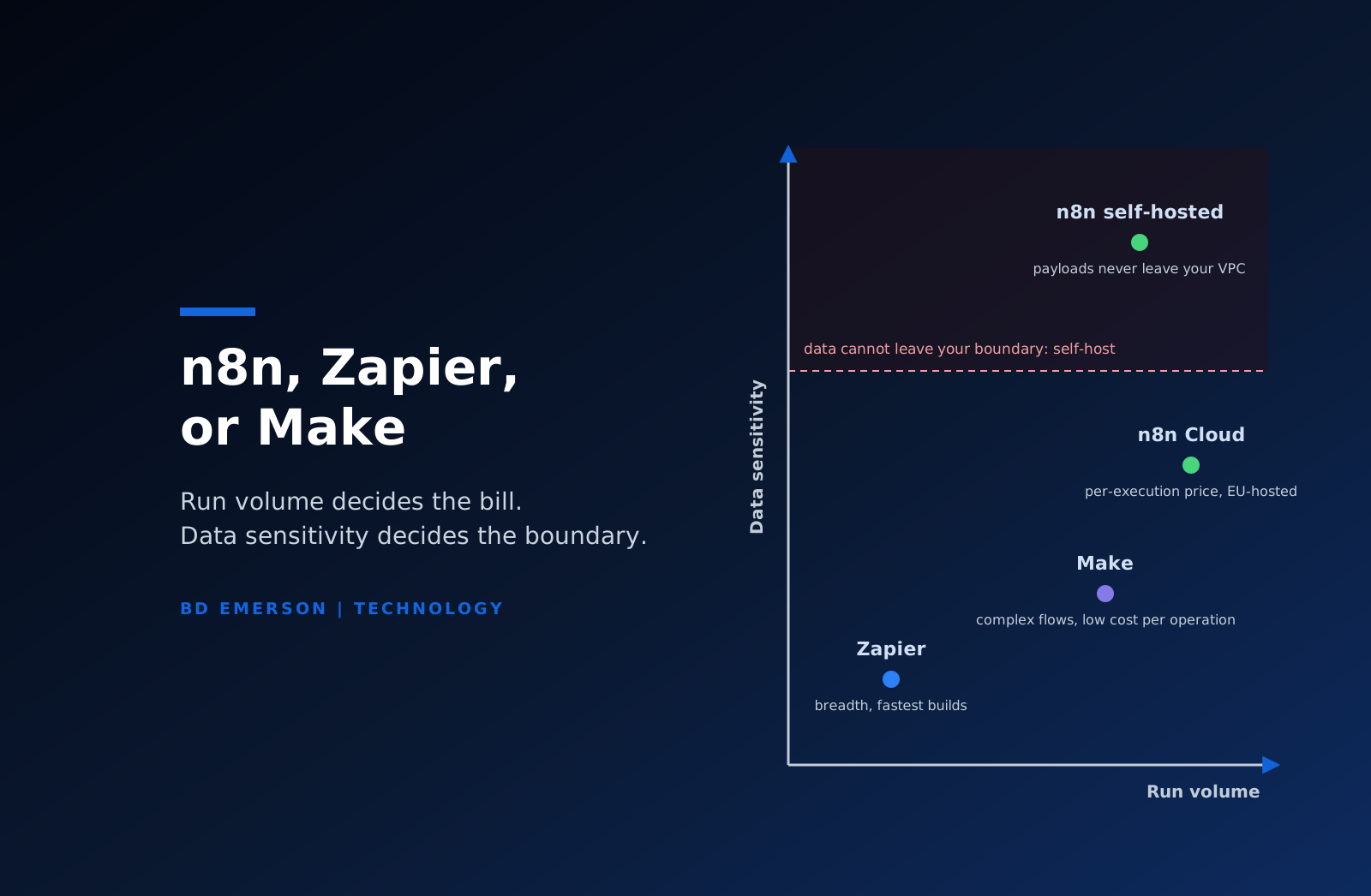
Two axes settle most platform arguments: how often workflows run, and how sensitive the data inside them is.
- Low volume and low sensitivity: Zapier. The platform fee is small, the build is fast, and per-task pricing at low volume is cheap. Most internal team automation lives here.
- High volume or heavy branching with moderate sensitivity: Make, or n8n Cloud once monthly steps reach six figures and per-execution pricing overtakes per-operation pricing.
- Sensitive data that cannot leave your boundary, at any volume: self-hosted n8n, with the operational ownership that entails.
- High volume and high sensitivity together: self-hosted n8n run as production infrastructure, with queue mode, monitoring, and a named owner on call.
Before committing, spend one hour on a volume forecast: list the workflows, estimate runs per month for each, and multiply by step count for the per-step platforms. Teams routinely discover that their small automation footprint is 200,000 steps a month, and the platform decision looks different at that number.
Where BD Emerson fits
BD Emerson builds on all three platforms and resells none of them, so the recommendation follows the workload rather than a vendor relationship. Platform selection is usually the second question anyway. The first is which processes deserve automation at all, which we cover in our business process automation guide. When the answer involves stitching core systems together rather than gluing SaaS edges, that becomes system integration work, and when you want the platform decision, the build, and the security review handled as one engagement, that is what our automation consulting practice does.

About the author