AI Code Security: Securing Code Written by Claude Code, Cursor, and Copilot
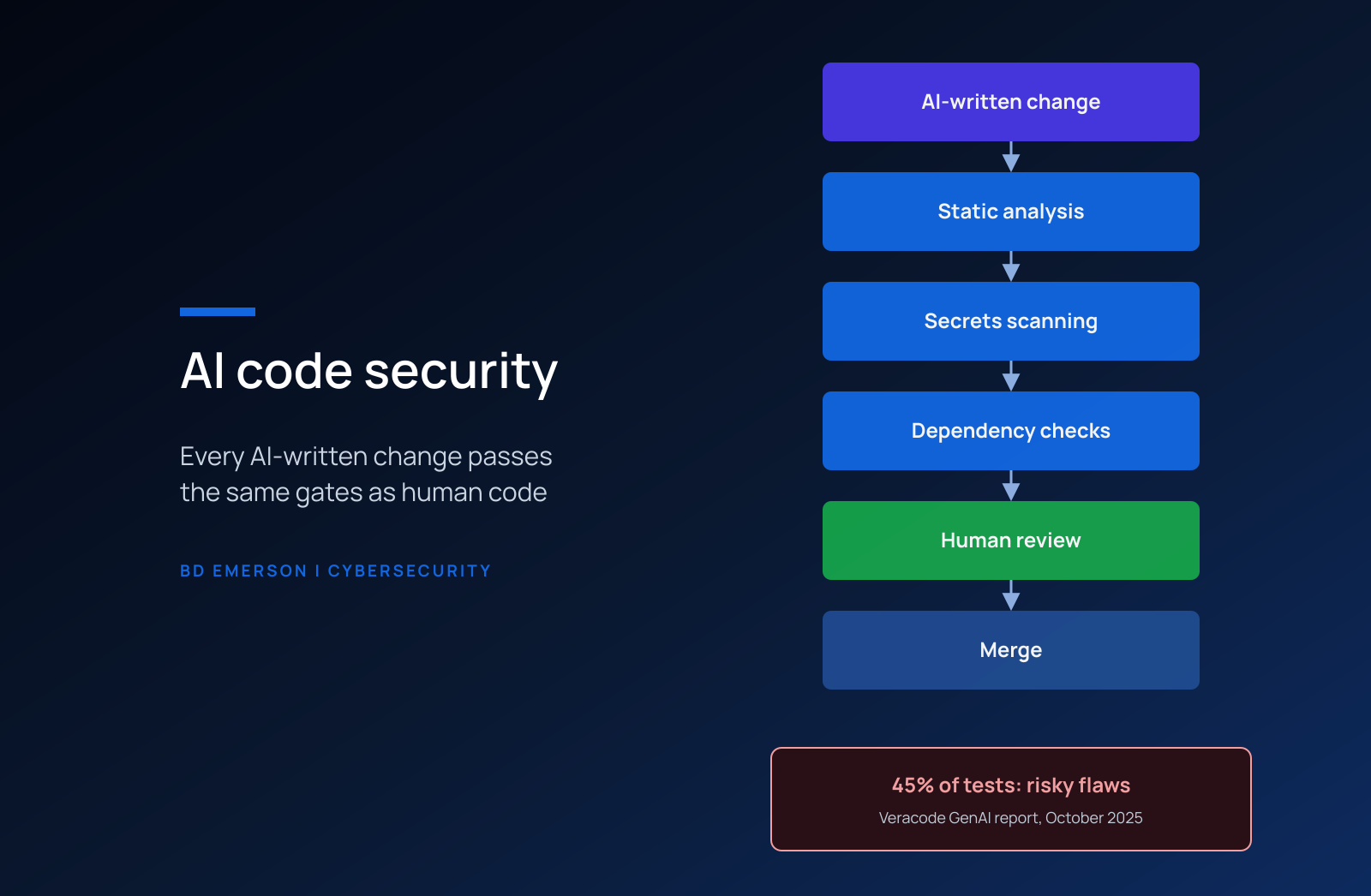
AI code security is the practice of making code written with AI coding assistants as safe as code written by people, and of making the assistants themselves safe to run. It covers three risks: assistants generating insecure code, assistants becoming a path for attackers through prompt injection or overbroad access, and new supply chain exposure from packages and patterns the model suggests. The controls fall into two layers. Configure each assistant, whether Claude Code, Cursor, or GitHub Copilot, so it cannot read secrets or run unapproved commands. Then keep every AI-written change behind the same gates as human code: static analysis, secrets scanning, dependency checks, and a required human review before merge.
How insecure is AI-generated code?
Research results vary with the models and tasks tested, but they point the same way. Georgetown's Center for Security and Emerging Technology evaluated code from five large language models given the same prompts and reported in November 2024 that almost half of the code snippets contained bugs, while noting that the results are limited to the scope of its evaluation. Veracode's October 2025 update to its GenAI code security report, covering more than 100 models across Java, JavaScript, Python, and C#, reported that AI-generated code introduced risky security flaws in 45 percent of tests, and that larger, newer models did not improve security.
Two conclusions follow. AI-written code needs at least the scrutiny you give a new developer's code, and model upgrades will not fix the problem for you. The CSET paper adds a third point worth taking seriously: responsibility for secure AI-generated code should not rest only on the individual developer who accepts a suggestion. The organization has to set the controls.
What are the three AI coding risks?
CSET groups the risks into three categories, and they map cleanly to controls.
The first is insecure output: injection flaws, missing input validation, weak cryptography, hardcoded credentials, and logic errors that pass a quick read. The fix is the security testing you already run, applied without exceptions, plus prompts and repository instructions that state your secure coding standards.
The second is the assistant as an attack surface. A coding agent reads files, issues, documentation, and web pages, and runs commands in a developer's shell. A malicious instruction hidden in a README or an issue can steer it, and an agent with access to secrets or a network connection can leak them. This is the same prompt injection problem covered in the OWASP Top 10 for LLM applications, with a shell attached.
The third is downstream and supply chain exposure. Assistants suggest dependencies, sometimes ones that do not exist or that an attacker has registered under a plausible name, and they repeat patterns from their training data. Dependency pinning, an approved package registry, and software composition analysis catch most of it.
How do you configure Claude Code, Cursor, and Copilot securely?
Each assistant offers different controls, and each has documented limits. The table summarizes what the vendors publish.
| Assistant | Main controls | Documented limit |
|---|---|---|
| Claude Code | Permission rules (allow, ask, deny) evaluated deny first, enforced by Claude Code rather than the model; OS-level sandbox for shell commands; managed settings that users cannot override | Server-managed settings are a client-side control that a user on an unmanaged device can bypass; endpoint-managed settings are stronger |
| Cursor | .cursorignore blocks the agent and Tab from listed files; admins can enforce Privacy Mode, approve models, allowlist MCP servers and their tools, and stream audit logs to a SIEM | Terminal and MCP tools used by the agent cannot block access to ignored files, and Cursor says complete protection is not guaranteed |
| GitHub Copilot | Content exclusion keeps listed files out of suggestions, chat, agents, and code review on Business and Enterprise plans | GitHub says content exclusion is not a filesystem security boundary, agents might still reach excluded files indirectly, and chat in Xcode and Eclipse does not support it |
Sources: Anthropic's Claude Code permissions documentation, Cursor's ignore file and enterprise hardening guides, and GitHub's content exclusion documentation.
The pattern across all three is the same. File-level exclusions are a convenience and do not stop an agent with shell access from reading a file. The controls that hold are the ones enforced outside the model: deny rules, OS sandboxing, network restrictions, and keeping secrets out of the working directory entirely. Store credentials in a vault, inject them at run time, and give coding agents no standing access to production.
Which pipeline gates should every AI-written change pass?
Treat the pipeline as the control that does not depend on any assistant's settings. We put five gates in front of every merge, and we apply them equally to human and AI-written changes:
- Static analysis on every pull request, with high-severity findings blocking the merge.
- Secrets scanning on every commit, with push protection so a leaked key never reaches the remote.
- Software composition analysis against an approved registry, so a suggested package that does not exist or is not approved fails the build.
- Required human review by someone other than the person who prompted the change, with a pull request template that records which parts an assistant wrote.
- Dynamic testing of the running application on a schedule and before major releases.
The review gate is the one teams weaken first, because AI tools produce more changes than reviewers can read. Keep pull requests small, require tests with every change, and track review time so the gate does not quietly become a rubber stamp. Our article on DevSecOps best practices covers how to tune these gates so they block real issues without stalling delivery.
What changes when coding agents work on their own?
Assistants that suggest code inside an editor are one thing. Agents that take a ticket, work in a cloud environment for an hour, and open a pull request are another, and they need controls of their own. Give each agent a dedicated machine identity in your source control system rather than a developer's token, so its commits and pull requests are attributable and its access can be revoked on its own. Restrict that identity to the repositories and branches it needs, and never let it push to a protected branch or approve its own pull request.
Run cloud agents in isolated environments with no standing credentials and an egress allowlist, so a compromised task cannot reach anything outside its job. Treat every MCP server a coding agent can call as part of the attack surface, because a server that reads issues or web pages feeds untrusted text straight into the agent's context. Our article on MCP security explains how to approve and isolate those servers. Finally, log the agent's actions, including the commands it ran and the files it read, and keep those logs with the pull request so a reviewer can see how a change was made as well as what it contains.
What policy should govern AI coding assistants?
Write a short policy that answers four questions. Which assistants are approved, on which plans, with which settings? Which repositories and data may they access, and which are excluded? What must a developer do before merging AI-written code? And who reviews the assistant configuration, and how often?
For a reference framework, NIST published SP 800-218A in July 2024, a community profile that adds practices specific to AI model development to the Secure Software Development Framework. It is aimed at producers of AI models and AI systems and at the organizations that acquire them, and its practices give your secure development policy a citation your auditors will recognize.
How should you test AI coding security?
Test the configuration as well as the code. Plant a test secret in a repository and confirm the assistant cannot read or send it. Put a benign injected instruction in an issue and see whether the agent follows it. Check whether a developer can turn off the managed policy on a company laptop. Review a sample of merged pull requests to confirm the review gate held. These tests take days, and they find gaps that a policy review misses.
How BD Emerson helps
BD Emerson secures AI-assisted development for engineering organizations: assistant configuration and managed policy for Claude Code, Cursor, and Copilot, pipeline gates for static analysis, secrets, and dependencies, the secure development policy, and testing that proves the controls work. Our offensive team tests coding agents with the same injection and exfiltration techniques attackers use.
If your developers already use AI coding tools, our DevSecOps consulting team can review your assistant settings and pipeline, close the gaps, and give your auditors evidence that AI-written code meets the same bar as everything else.

About the author